


Most small offices don't fail at listing→close because they lack a strategy. They fail because the strategy lives in someone's head, and the head is busy showing houses. The playbook says "coordinate the inspection," but nobody wrote down who confirms the inspector, when the seller gets notified, or what happens when the inspector reschedules at 4:47pm on a Friday.
This kit fixes exactly that gap. It's the connective tissue between a good playbook and what actually happens on Tuesday. If you've already built the strategy side — and if you haven't, the repeatable listing‑to‑close operations system is the parent piece you want to slot this under — this gives you the physical artifacts: tracker fields, a 72‑hour view, SLA tiers, role routines, and the scripts you'll actually send.
Everything below is built to be implemented in under two hours for a three‑agent office. No rework of your strategy. Just copy, paste, fill, run.
Why the 72‑hour window is the only one that matters
A full pipeline view is useful for forecasting and basically useless for execution. When an agent opens a 60‑deal dashboard in the morning, their brain does the thing every brain does — it skims, finds nothing on fire, and closes the tab. Nothing moves.
The 72‑hour lookahead tracker works because it's the smallest window that still gives you time to react. Three days is long enough to fix a missing inspection confirmation or chase a lender, and short enough that nothing on the list can be ignored. Teams who look 10 days out drown. Teams who look 24 hours out are already late. Seventy‑two hours is the sweet spot where a reschedule is still an inconvenience rather than a crisis.
The practical rule: every item on the 72‑hour view has a date, an owner, and a next action due within the next three calendar days. If it doesn't have all three, it doesn't belong on the view yet.
The shared tracker: exact fields and types
This is the spine of the whole kit. Build it as a single Google Sheet tab called Tracker. One row per active deal. Here are the exact columns, the type each should be, and why it exists.
Never miss a showing or follow-up again.
TryRealy helps you schedule, track, and manage every client interaction smoothly.
- Unified property and client management
- Automated client notifications
- Integrated sales pipeline tracking
No credit card required
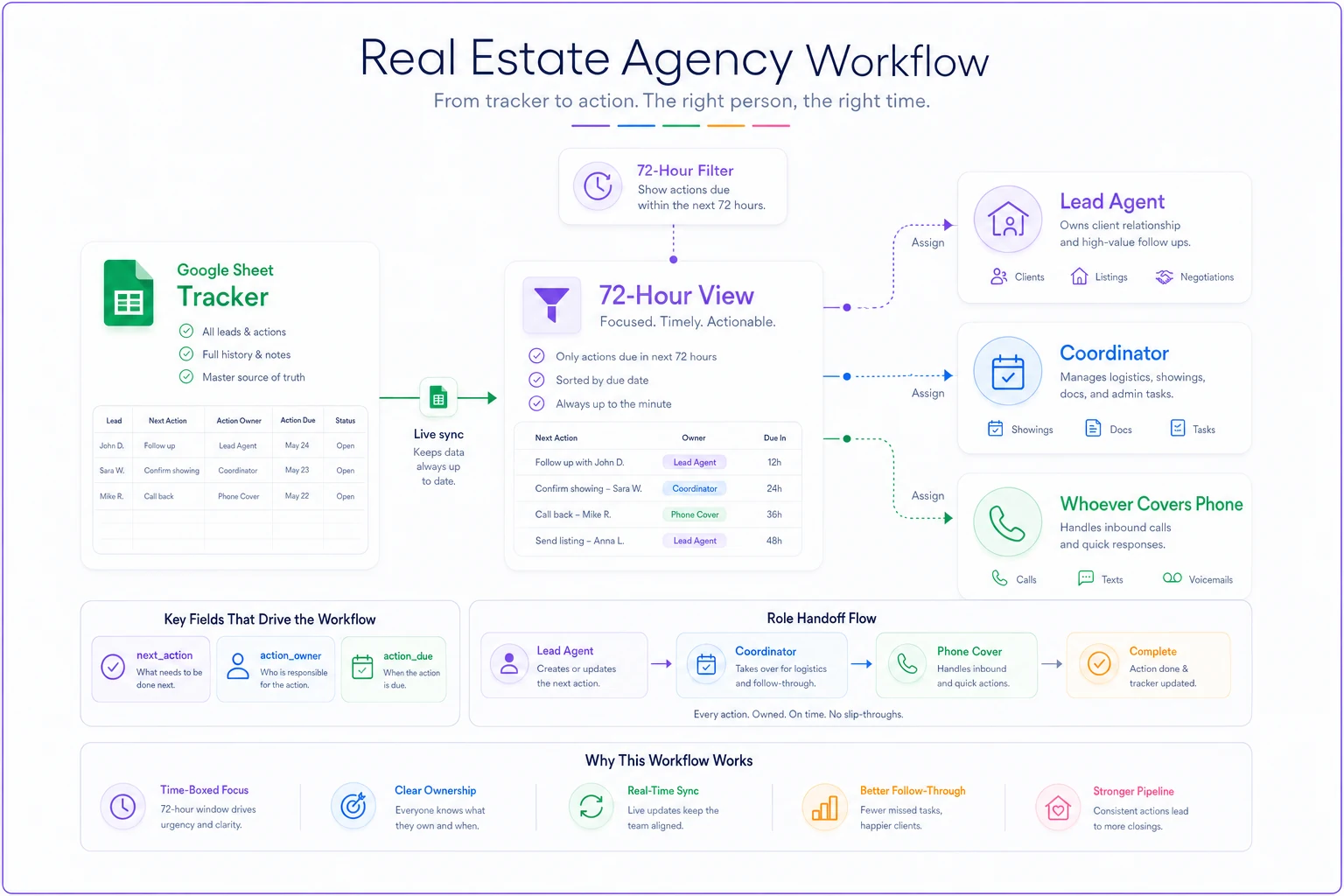
A simple visual of how the Tracker feeds the 72‑hour view and role routines.
| Field | Type | Why it's there |
|---|---|---|
deal_id | Text (e.g. 2024‑0147) | Stable reference so texts/emails can quote it |
address | Text | Human‑readable anchor |
stage | Dropdown: Launch / Showings / Inspection / Closing | Drives the SLA tier automatically |
lead_agent | Dropdown (3 names) | Single accountable owner |
coordinator | Dropdown (name or "none") | Who does the chasing |
key_date | Date | The next hard deadline that matters |
next_action | Text | One sentence, verb‑first ("Confirm inspector") |
action_owner | Dropdown | Who owns that next action |
action_due | Date | Feeds the 72‑hour filter |
status | Dropdown: On‑track / On‑risk / Blocked / Clear | The only field a manager scans |
sla_tier | Auto/formula | Pulled from stage |
last_touch | Date | Catches silent deals |
notes | Text | Free field, dated entries only |
Two field choices matter more than the rest. First, status should never have more than four values — the moment you add "mostly on track" or "slight delay," people stop making real calls and everything turns yellow. Second, next_action must be a verb. "Inspection" is not an action. "Email seller the inspection window" is. The difference sounds small, but a verb tells the next person exactly what hasn't happened yet.
Limit
statusto four values so people make decisive calls.
``
dealid,address,stage,leadagent,coordinator,keydate,nextaction,actionowner,actiondue,status,slatier,lasttouch,notes
``
Drop that into an empty sheet, freeze the top row, and you have the tracker. The 72‑hour view is just a filtered version of this same tab — filter action_due to today + 3 days, sort by status (Blocked and On‑risk at top). Don't build a second sheet. One source of truth, filtered differently.
SLA tiers by stage
Not every stage deserves the same urgency, and treating them equally is how offices burn out chasing things that don't matter while actual fires spread. Here's a tiered structure that maps response expectations to each stage of the listing→close journey.
| Stage | SLA tier | Response expectation | Escalate if... |
|---|---|---|---|
| Launch | Tier 1 | Live on MLS + photos ordered within 48h of signed listing | Not live by hour 48 |
| Showings | Tier 2 | Showing requests answered in 2 business hours; feedback logged within 24h | No feedback logged after 3 showings |
| Inspection | Tier 1 | Inspection scheduled within 24h of accepted offer; report circulated same day as received | Report not sent to seller within 4h |
| Closing | Tier 1 | Clear‑to‑close confirmed 72h before close; funds/docs checked daily in final week | Any missing item inside 72h window |
The pattern worth noticing: Launch and Closing are both Tier 1 because they're the two moments where a dropped ball is either expensive or embarrassing. Showings get a slightly looser tier not because they matter less, but because volume is high and over‑escalating them trains your team to ignore alerts.
Role micro‑routines (what each person actually does, daily)
A playbook that says "agents should stay on top of their deals" is worthless. Micro‑routines turn that into a 10‑minute habit each person can run without thinking. For a three‑person office, assign these.
Lead agent — morning, ~8 minutes
-
Open the 72‑hour view.
-
Scan
statuscolumn top to bottom. -
For every Blocked or On‑risk row, confirm there's a
next_actionwith an owner and a due date. -
Send any client‑facing message that only you can send (price convos, offer strategy).
-
Update
last_touchon anything you touched.
Coordinator — morning and mid‑afternoon, ~10 minutes each
-
Filter to rows where
actionowner= you andactiondue≤ today. -
Work the list top to bottom.
-
Flip
statusto Clear or On‑risk as you learn new info. -
Chase vendors (inspectors, photographers, title) and log a dated note.
Whoever covers the phone — rolling
-
Any inbound showing request or lender/title call gets logged to the right
deal_idwithin 15 minutes, even if just a one‑line note.
What breaks these routines isn't complexity — it's the exception. An agent gets pulled into a showing and skips the morning scan. One missed scan is fine. Three in a row is how a deal goes silent for a week. The fix is pairing: the coordinator's afternoon pass catches anything the lead agent missed in the morning. Redundancy beats discipline in a small team.
Fillable checklists per stage
Paste these into a second tab called Checklists, one block per stage.
Use them as the actual steps that generate each next_action on the tracker.
Launch checklist
-
[ ] Listing agreement signed and filed
-
[ ] Photos/video ordered (vendor + date confirmed)
-
[ ] MLS draft built, description proofread
-
[ ] Seller disclosures collected
-
[ ] Go‑live date set and confirmed with seller
-
[ ] Syndication checked 24h after live
Showings checklist
-
[ ] Showing instructions live and correct
-
[ ] Feedback form/process set
-
[ ] Feedback logged after each showing
-
[ ] Weekly seller update sent
-
[ ] Price/activity review triggered after X showings with no offer
Inspection checklist
-
[ ] Inspector scheduled within 24h of accepted offer
-
[ ] Access coordinated with seller
-
[ ] Report received and reviewed
-
[ ] Report + summary sent to seller same day
-
[ ] Repair/credit response deadline tracked
Closing checklist
-
[ ] Title ordered
-
[ ] Appraisal ordered and date known
-
[ ] Loan milestones tracked (appraisal, underwriting, CTC)
-
[ ] Final walkthrough scheduled
-
[ ] Clear‑to‑close confirmed 72h out
-
[ ] Closing docs and funds verified day before
Use them as the actual steps that generate each next_action on the tracker.
Copy‑paste messages: on‑risk and clear‑to‑close
These are the two moments where the right message, sent fast, saves the deal or saves your reputation. Keep them short. Fill the brackets.
On‑risk — text to seller (showings stalling)
> Hi [Name], quick update on [address]. We've had [#] showings with solid interest but no offer yet. I'd like to grab 10 min this week to talk through what feedback is telling us. Does [day/time] work?
On‑risk — email to lender (closing slipping)
> Subject: [Address] — checking timeline, close [date] > Hi [Name], we're 72h from close on [address]. Can you confirm we have clear‑to‑close, or flag anything still open? Want to make sure we protect the [date] close for everyone. Thanks.
On‑risk — phone script (inspection reschedule)
> "Hi [Name], the inspector pushed to [new date], which puts us tight against the response deadline. I want to get ahead of it — can we talk through options so nothing slips? Two minutes now saves us a scramble later."
Clear‑to‑close — text to buyer/seller
> Great news on [address] — we're officially clear to close. Closing is set for [date] at [time/place]. I'll send the final checklist tonight. Almost there.
Clear‑to‑close — internal note (flip status to Clear)
> CTC confirmed [date] by [lender]. Walkthrough [date]. Docs verified. Nothing open.
The on‑risk messages are proactive, not reactive. You're sending them before the client notices a problem. That one habit — flagging risk first — is the difference between a client who trusts you and one who thinks you're asleep at the wheel.
Escalation rules (keep them dumb‑simple)
Escalation fails when it's vague. "Loop in the manager if needed" means nobody ever does. Use hard triggers instead.
-
Any row sits Blocked for more than 24 hours → coordinator messages lead agent directly.
-
Any Tier 1 SLA breach (Launch not live at 48h, report not sent in 4h, CTC not confirmed inside 72h) → immediate flag to lead agent, same day.
-
Any deal with no
last_touchfor 5 days → surfaces on the morning scan as a silent‑deal alert. -
If the lead agent is unreachable for 4+ hours on a Tier 1 item → coordinator acts on the pre‑agreed default (confirm the appointment, send the holding message) rather than waiting.
Rule 4 is the one most offices skip, and it's the one that saves closings. In a three‑person team, waiting for permission is the actual bottleneck. Decide in advance what the coordinator is allowed to do without asking, and the whole system stops stalling on one person's availability.
The 6 KPIs worth watching (and no more)
Six. Not twenty. A three‑agent office can't act on twenty numbers, and a dashboard nobody acts on is just decoration.
-
Launch speed — median hours from signed listing to live. Target: under 48.
-
Showing response time — median time to answer a request. Target: under 2 business hours.
-
Feedback logged rate — % of showings with feedback entered within 24h.
-
Silent‑deal count — deals with no touch in 5+ days. Target
zero.
-
CTC lead time — median hours clear‑to‑close is confirmed before close. Target: 72+.
-
On‑time close rate — % of deals that close on the original date.
Track these weekly, in five minutes, from the tracker itself. The one that predicts everything else is silent‑deal count. When it creeps above zero, it's the earliest signal your routines are slipping — usually a week or two before anything actually goes wrong.
A real scenario: a three‑agent suburban office
A small residential team — two agents plus one part‑time coordinator — was running around 9–11 active deals at any time, all tracked through a mix of CRM notes and memory. Over one quarter they had two closings slip past the original date and one inspection deadline nearly missed because the report sat unread in an inbox for most of a day.
They built this exact kit in an afternoon. Tracker tab, filtered 72‑hour view, the four‑value status column, and the coordinator's twice‑daily pass. Nothing fancy — a Google Sheet and a shared habit.
The change over the next couple of months wasn't dramatic in any single week, which is kind of the point. Silent deals dropped to basically zero because the 5‑day alert caught them early. On‑time closings went from "most of them, usually" to nearly all of them. The coordinator stopped getting panicked 4pm texts because the on‑risk messages were going out a day or two earlier. The agents described it as the office finally feeling "quiet" — no more surprise fires.
When this kit makes sense (and when it doesn't)
Use it if you're a 1–5 person office running deals through spreadsheets, memory, or a CRM that's too heavy to glance at daily. The whole value is a simple, scannable surface everyone actually opens.
Skip it if you've already got a well‑configured transaction management platform with working alerts and a team that trusts it. Don't bolt a sheet onto a system that already does this — you'll split your source of truth and end up with two half‑used tools.
Be careful if you have more than one person who thinks they own the tracker. One owner of the structure, shared ownership of the rows. Two people reformatting columns is how a clean sheet turns into chaos by Friday.
Where tools help — and where they don't
A Google Sheet is genuinely enough to start, and most offices should start there. The sheet is where you learn what your real routines are before you automate anything. Automating a broken process just makes it break faster.
Once the habits stick, the natural upgrades are the boring, repetitive parts: the 5‑day silent‑deal flag, the SLA‑breach alert, the CTC countdown. These are exactly the things a workflow platform with light automation handles well — surfacing the right row to the right person at the right moment so nobody has to remember to look. But that's step two. The kit above is step one, and step one is the part that actually changes how your week feels.
Build the sheet today. Run it for two weeks. The deals that stop going silent will tell you it's working.
Build the sheet today. Run it for two weeks. The deals that stop going silent will tell you it's working.
Ready to elevate your real estate business?
Join 2,000+ agencies using TryRealy to streamline operations, close deals faster, and deliver exceptional client experiences.