

Most agencies have a photographer, maybe a video person, and someone who handles floorplans. What they usually don't have is a hard line between received the files and approved the files. Those two things get treated as one step. The vendor uploads to Dropbox, someone glances at thumbnails, and the listing goes live. Then the seller texts asking why the living room looks yellow, why the drone shot cuts off the roofline, or why the floorplan lists the primary bedroom as 9x10 when it's clearly bigger. Now you're re-ordering assets on a listing that's already public, and the timeline you thought you had is gone. The fix isn't a better vendor. It's a creative acceptance checklist for real estate that turns "looks fine" into a pass/fail decision made against the same criteria every single time — plus a re-delivery SLA and a fallback plan so one bad delivery doesn't blow your launch date.
Why "looks fine" fails as a QC gate
Eyeballing thumbnails means acceptance becomes a mood, not a standard. On a slow Tuesday, someone scrolls through 32 photos and approves them in 90 seconds. On a chaotic Friday with three listings going live, the same person approves worse work in 40 seconds because they're rushed.
A few patterns come up over and over:
-
Nobody owns rejection. Approving is easy. Rejecting means an awkward message to the vendor and a delay you have to explain to the seller. So people approve borderline work to avoid the conflict.
-
Standards live in one person's head. The team lead knows the sky should be replaced on exterior shots and that vertical lines need to be straight. The new coordinator doesn't. Quality swings depending on who checked.
-
The vendor never gets clean feedback. "Can you fix a few of these?" is not actionable. The vendor guesses, re-delivers something slightly different, and you're two rounds deep on a listing that should've been live yesterday.
This is really a documentation and enforcement gap, which is why it pairs closely with a broader production pipeline for video, floorplans and virtual tours — the acceptance gate is the last checkpoint in that pipeline, and it's the one that gets skipped most.
The rubric: what pass/fail actually means
A rubric only works if it's specific enough that two different people reviewing the same photo reach the same verdict. Vague criteria ("good lighting") produce vague approvals. Here's the level of specificity that holds up.
Never miss a showing or follow-up again.
TryRealy helps you schedule, track, and manage every client interaction smoothly.
- Unified property and client management
- Automated client notifications
- Integrated sales pipeline tracking
No credit card required
Photo rubric
| Criteria | Pass | Fail |
|---|---|---|
| Exposure | Windows show exterior detail, no blown-out whites in living spaces | Windows pure white, or shadows crushed to black |
| Vertical lines | Walls and door frames straight | Noticeable keystoning / leaning walls |
| Color balance | Whites read white, no orange/blue cast | Yellow tungsten cast or blue shade cast |
| Sky (exteriors) | Clear or lightly clouded, replaced if grey | Flat grey/overcast sky left unedited |
| Staging accuracy | Rooms match current condition | Old furniture, listing agent's coffee cup, cords everywhere |
| Coverage | Every key room + primary exterior angles | Missing a bedroom, bathroom, or backyard |
| Count | Matches order (e.g., 28–35 for a 3BR) | Short of contracted minimum |
Video rubric
-
Stabilized footage, no visible shake on walking shots
-
Consistent exposure between rooms (no bright-to-dark jumps)
-
Audio bed present, no random ambient noise or dog barking
-
Correct property — sounds obvious, but wrong-address intros happen more than you'd think
-
Length within the agreed range (typically 60–90 seconds for MLS/social)
-
Branding/lower-thirds match the agent's current template
Floorplan rubric
-
Total square footage within a stated tolerance of MLS/public record (e.g., ±3%)
-
Every room labeled and dimensioned
-
North arrow present
-
Doors and windows shown, not just walls
-
Scale accurate — no primary bedroom mysteriously smaller than a closet
-
File delivered in both the web format and the print-ready format you ordered
The point of writing these down is that the reviewer stops making judgment calls and starts checking boxes. When a floorplan's square footage is off by 8%, that's a fail regardless of how nice it looks. No debate, no mood.
Standardized feedback templates (so vendors can actually fix it)
The biggest time-killer isn't the rejection itself — it's the vague rejection that kicks off a guessing loop. Structured feedback cuts re-delivery rounds because the vendor knows exactly what needs fixing and where.
Two templates the team can copy-paste and fill in:
Photo rejection
> Listing: [address] > Status: Re-delivery requested > Items to fix: > - Photo 4 (kitchen): yellow color cast, please neutralize white balance > - Photo 11 (exterior front): grey sky, please replace > - Photo 19 (primary bath): mirror shows tripod/photographer, please clone out > Everything else approved. Re-deliver only the 3 above. > Needed by: [date/time per SLA]
Floorplan rejection
> Listing: [address] > Status: Re-delivery requested > Items to fix: > - Total sqft shows 2,410; public record is 2,180 (10.5% over tolerance). Please re-measure or reconcile. > - Primary bedroom missing dimensions > - North arrow missing > Needed by: [date/time per SLA]
Use the "Everything else approved" line to prevent vendors re-processing files that don't need changes.
Notice the "everything else approved" line and "re-deliver only the 3 above." That single instruction prevents the vendor from re-processing the whole set and accidentally breaking photos that were already fine. It also keeps the second review fast — you only re-check what changed.
Re-delivery SLAs and the clauses that protect your launch date
An SLA nobody wrote down is just hope. The clauses below are the ones that actually keep a launch on schedule, because they tie timing to consequences instead of goodwill.
Sample clauses worth putting into your vendor agreements:
-
Initial delivery window. "Edited assets delivered within 24 hours of shoot completion for standard listings; 48 hours for properties over 4,000 sq ft or with drone/video."
-
Re-delivery SLA. "Requested corrections delivered within 12 business hours of a documented re-delivery request."
-
Tolerance definitions. "Floorplan square footage must fall within ±3% of public record; deviations require re-measurement at no charge."
-
Round cap. "No more than two re-delivery rounds per listing; a third failure escalates to backup vendor at original vendor's cost."
-
Late-delivery credit. "Delivery past the SLA window reduces the invoice by [X]% per 12 hours late."
That last clause matters more than people expect. When lateness has a price, "I'll have it tomorrow" stops being a free move for the vendor. These acceptance clauses sit naturally alongside the broader scorecards in your vendor SLAs for staging, photography and inspection — the acceptance rubric is what generates the pass/fail data those scorecards run on.
Automated escalation to a backup vendor
Here's the scenario a round cap is built for. It's Wednesday, the listing goes live Friday morning. Your primary photographer delivers Wednesday night, but the exterior sky is grey, two rooms are underexposed, and the floorplan is 9% over on square footage. You send a structured rejection. Thursday afternoon, the re-delivery comes back with the sky fixed but the same underexposed rooms. That's round two, still failing, and you're out of runway.
Without a rule, someone panics and either ships bad assets or pushes the launch. With a rule, the escalation is automatic:
The escalation workflow, in order:
-
Re-delivery request logged with the structured feedback template. Round counter goes to 1.
-
Second failure logged. Round counter goes to 2, cap reached.
-
System (or the coordinator) triggers the backup vendor with the same rubric and the original brief.
-
Primary vendor's invoice absorbs the backup cost per the round-cap clause.
-
Launch date holds because the backup was already contracted and briefed before the crunch.
Here's a simple visual of that escalation workflow.
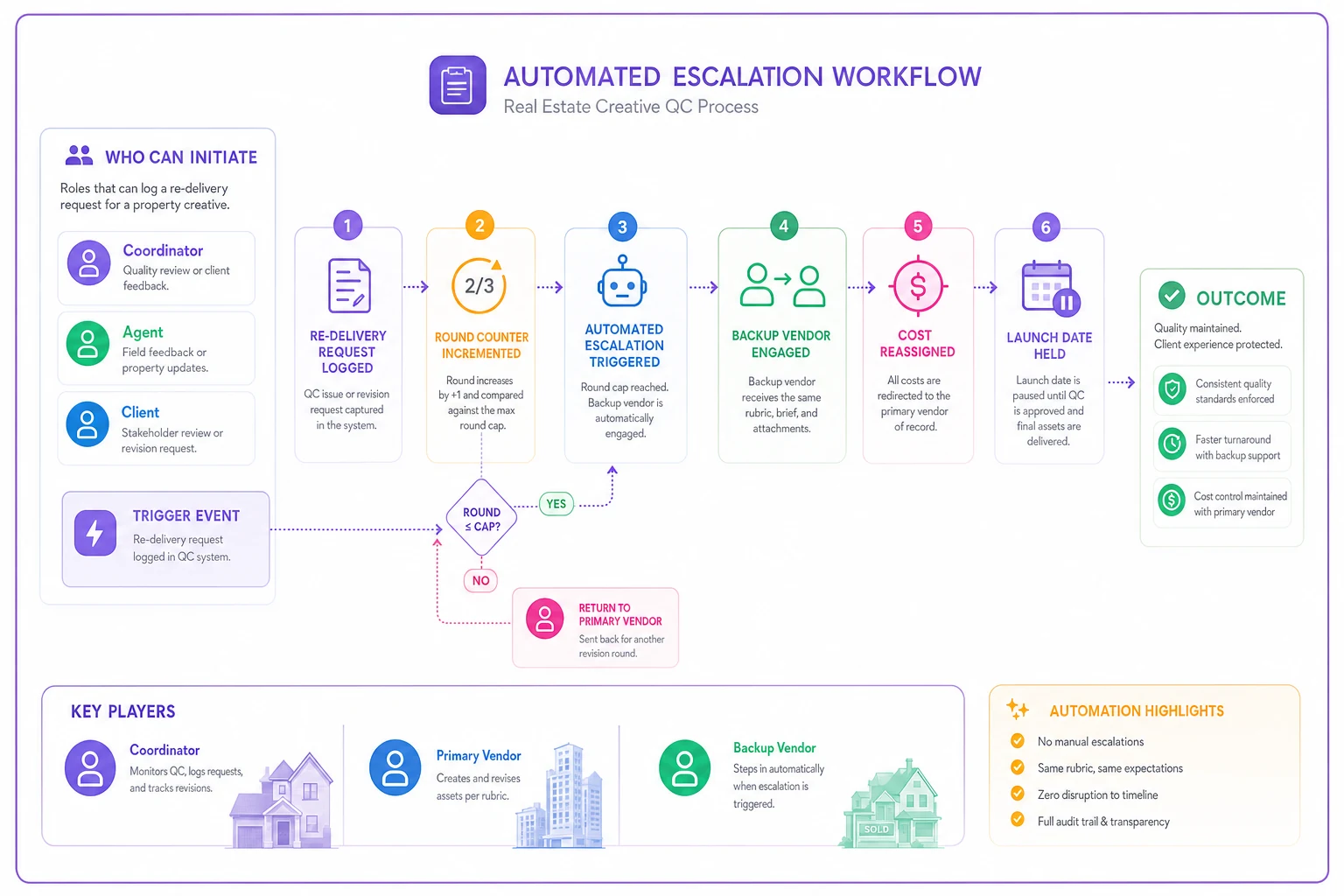
The part most agencies skip is step 5's prerequisite: the backup vendor exists before you need them. A backup you have to go find at 4 p.m. Thursday isn't a backup, it's a second emergency. Sign one, give them your rubric, and run a test shoot so their output already matches your pass criteria before you ever need to call them.
This is where operational software earns its keep — logging each delivery against the rubric, counting re-delivery rounds automatically, and firing the backup-vendor notification when the cap trips, so nobody has to remember the rule under pressure. The value isn't the automation for its own sake; it's that your launch date stops depending on someone catching the problem in time.
A real scenario
A four-agent brokerage running around 12–15 listings a month was launching most listings a day late, and roughly one in five needed a re-shoot after going live. The re-shoots weren't even the expensive part — the seller trust hit was. Two sellers openly questioned whether the team had their listing under control.
They put in a one-page photo/video/floorplan rubric, the two feedback templates, and a 12-hour re-delivery SLA with a two-round cap. They also signed a backup photographer and ran one test shoot to calibrate standards. Over the next couple of months: post-launch re-shoots dropped to maybe one every three or four weeks, most of them driven by seller requests rather than QC misses. Re-delivery rounds fell because the feedback was finally specific. Launch-day slippage mostly disappeared because the round cap caught bad deliveries before Friday instead of after. Nothing dramatic — it just stopped being chaotic.
When this makes sense — and when it doesn't
Worth building the full gate when:
-
You run enough listings that quality swings are noticeable month to month
-
You use more than one vendor, or one vendor with inconsistent output
-
Launch timing actually matters to your sellers (it usually does)
Probably overkill when:
-
You do one or two listings a month and personally review every asset yourself
-
You have a single vendor whose work you've never had to reject
Who should NOT bother automating escalation yet: agencies without a written rubric. Automate the escalation before you've standardized pass/fail, and all you've built is a faster way to send inconsistent work to a second vendor. Get the rubric and templates working manually first. The automation only helps once the standard is solid.
The one thing that makes all of this stick
The rubric and the SLA clauses do nothing if approving stays easier than rejecting. That's the real behavior you're changing. When a reviewer can reject a photo by checking a box against a written criterion — instead of composing an awkward message and personally owning the delay — rejection stops being a confrontation and becomes a step.
Everything above is just structure around that one shift. Write down what "pass" means. Make rejection a template, not a conversation. Put a price and a time limit on lateness. Have the backup already warmed up so escalation is boring instead of scary. Do that, and your launch dates stop living or dying on whether someone had a careful afternoon.
Everything above is just structure around that one shift. Write down what "pass" means. Make rejection a template, not a conversation. Put a price and a time limit on lateness. Have the backup already warmed up so escalation is boring instead of scary. Do that, and your launch dates stop living or dying on whether someone had a careful afternoon.
Ready to elevate your real estate business?
Join 2,000+ agencies using TryRealy to streamline operations, close deals faster, and deliver exceptional client experiences.