



Most listing landing pages don't fail because the photos are bad or the price is wrong. They fail at the three inches around the form button. Someone lands on the page, scrolls, likes the house, hovers near the "Request a Showing" button — and then closes the tab because the form asks for nine fields, the headline says nothing specific, and the button reads "Submit."
That's the gap this playbook fixes. Not a redesign. Not a new vendor. Just a tight, repeatable way for agents to test the pieces that actually move submissions: the headline, the call‑to‑action, the hero image, and the microcopy wrapped around the form.
The whole thing is built so a non‑technical agent or an office manager can run it. No developer, no analytics PhD, no six‑week sprint. You swap words in a page builder, log the numbers in a sheet, and let the clicks tell you what to keep.
Why listing pages leak submissions (and it's rarely the obvious stuff)
Small agency pages show this pattern constantly: decent traffic coming in from portals, boosted posts, or neighborhood SEO, but the conversion rate from visitor to form submission sitting somewhere around 1.5–3%. The agent assumes that's just "how it is." It isn't.
-
Generic headlines. "Beautiful 3BR Home in Riverside" tells the visitor what they already saw in the photo. It doesn't give them a reason to act now.
-
Vague CTAs. "Submit," "Send," and "Contact Us" are friction words. They signal effort, not benefit.
-
Hero images that bury the hook. The first image is a wide exterior shot on a gray day instead of the one feature that makes the house memorable.
-
Form microcopy that creates doubt. No reassurance about response time, no reason to trust the agent, phone field marked required when it scares people off.
The frustrating part is that these are all cheap to fix and almost nobody tests them in isolation. Agents redesign the whole page at once, can't tell what worked, and go back to guessing.
The point of a CRO playbook is to change one thing at a time so the page teaches you something every two weeks.
The minimal test matrix: only three variables that matter
You could test forty things on a listing page. Don't. On a small agency's traffic volume, testing too many variables means you never reach a conclusion before the listing goes under contract.
Never miss a showing or follow-up again.
TryRealy helps you schedule, track, and manage every client interaction smoothly.
- Unified property and client management
- Automated client notifications
- Integrated sales pipeline tracking
No credit card required
| Element | What you're testing | Why it moves submissions | Variants per test |
|---|---|---|---|
| Headline | The promise/hook above the fold | Decides whether they keep scrolling | 2–3 |
| CTA button | The words on the button + the microcopy under it | Reduces friction at the decision point | 2–3 |
| Hero image | The first photo they see | Sets emotional context in under a second | 2 |
Three elements, two to three variants each. You test them sequentially, not all at once, so you always know which change caused the lift.
A quick note on traffic: if a single listing page only gets 80–150 visitors over its live window, you won't hit statistical significance on subtle changes. That's fine. On low‑traffic pages, test big swings — a totally different headline angle, a totally different hero — rather than tiny tweaks. Small differences need volume you don't have.
Fill‑in‑the‑blank microcopy variants
This is the part agents actually need on a Tuesday afternoon. Copy these, drop in the specifics, and ship.
Headline variants
-
Scarcity angle "Only [X] homes left under [$price] in [neighborhood] — tour this one before [day]."
-
Lifestyle angle "Wake up [specific feature: to lake views / steps from [school] / in a walk‑to‑coffee neighborhood]."
-
Specific‑win angle "[Bed]BR with a [standout feature] and a [second feature] — rare for [neighborhood] under [$price]."
-
Timing angle "Just listed in [neighborhood] — showings start [date], and the good ones go in [X] days here."
None of them say "Beautiful" or "Stunning." Those words are invisible. For more on writing listing copy that actually pulls its weight, the breakdown in conversion‑focused property description templates pairs well with this.
CTA button variants
-
"See it in person — book a showing"
-
"Get the full price & disclosure info"
-
"Ask me about this home" (works better on agent‑branded pages)
-
"Reserve a tour time"
-
"Check if it's still available"
Avoid "Submit," "Send," "Inquire." They all feel like paperwork.
Microcopy under the form
-
Response‑time reassurance "I reply to every message within [X] hours — usually faster."
-
Low‑commitment framing "No pressure. Just reply and I'll send times that work for you."
-
Trust signal "[Agent name], [X] years selling homes in [neighborhood]."
-
Privacy nudge "Your info stays with me. No spam, ever."
One line under the button removes the hesitation that kills submissions. It doesn't need to be clever — it just needs to be honest.
Form field labels
-
Phone label
"Best number to text you tour times" (reframes why you want it)
-
Name label
"First name is fine"
-
Message field
"Anything you want to know? (optional)"
Fewer fields almost always wins. If you must ask for a phone number, soften it:
A 14‑day rapid test cadence agents can run alone
Most CRO efforts die because they have no rhythm. Someone changes a headline, forgets about it, and three weeks later can't remember what the old one said. This cadence fixes that by making each test short, boxed, and logged.
One variable. Two weeks. Clear decision. Repeat.
-
Day 0 — Set the baseline. Record the current page
exact headline, CTA text, hero image filename, and the last 14 days of visits plus submissions. This is your control. Don't skip it — without a baseline, every result is a guess.
-
Day 1 — Pick one variable and build the challenger. Say it's the CTA. Write two new button variants from the list above. Set up the page so visitors split between control and challenger (most page builders and landing tools handle this with a toggle or built‑in A/B feature).
-
Days 2–12 — Let it run untouched. The single biggest mistake is peeking and panicking. On day four the new version might look worse. Don't touch it. Early numbers swing wildly on small samples.
-
Day 13 — Read the result. Compare submission rate of control vs. challenger. Use the decision rule below.
-
Day 14 — Lock the winner, log it, queue the next test. The winning variant becomes the new control. The next test targets the next variable (headline → CTA → hero, rotating).
Decision rule for small volume: if the challenger beats control by a clear margin — say, a 20%+ relative lift in submission rate and at least 10–15 more submissions on that variant — keep it. If it's within a few submissions either way, call it a tie and keep whichever is simpler to maintain. Don't agonize over tiny differences. They're noise.
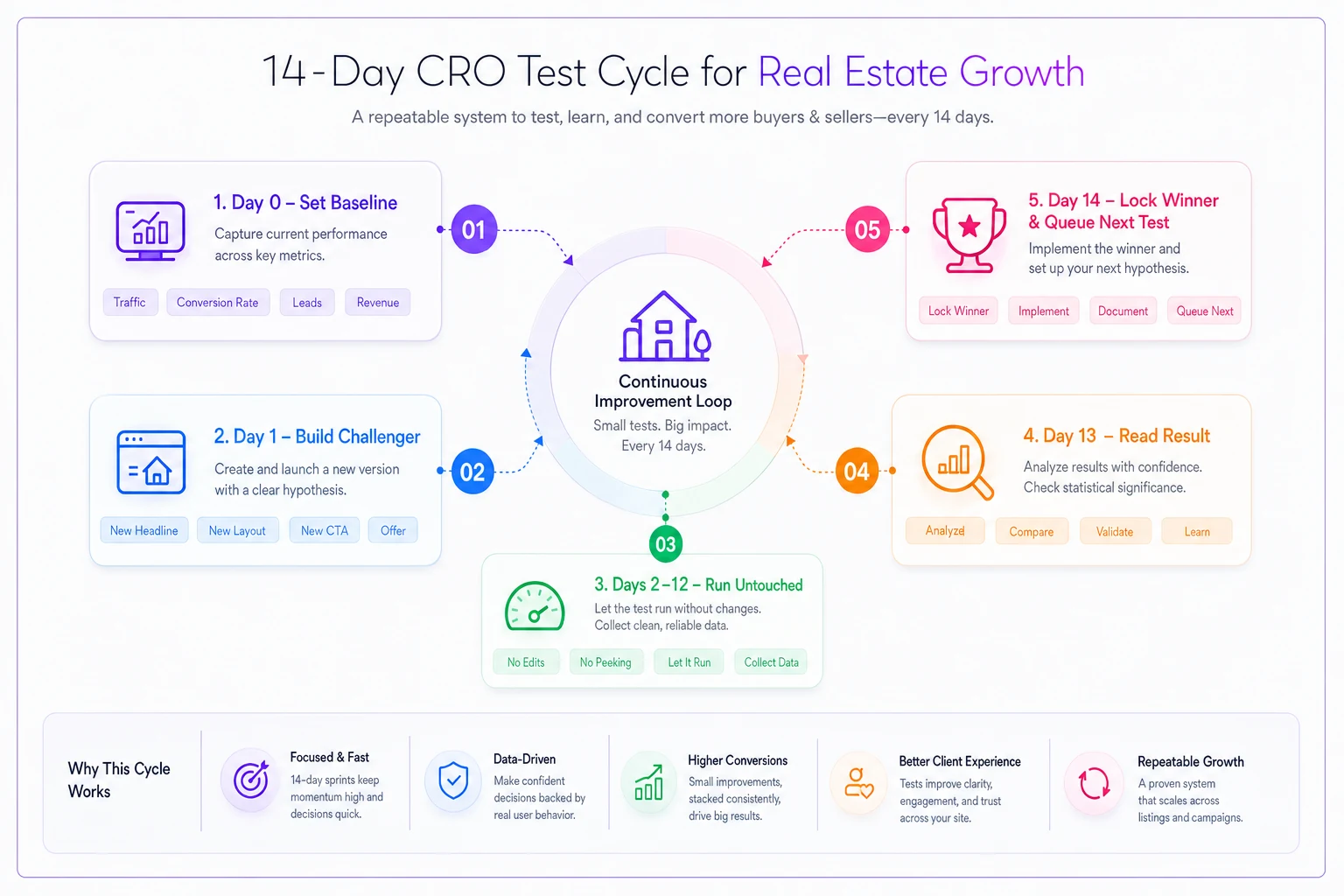
A simple visual of the loop helps teams remember the cadence and where they are in the cycle.
Performance tracking sheet (keep it boring)
You don't need a dashboard. A single sheet with these columns does the job and keeps every agent honest:
-
Test # / Date range
-
Variable tested (headline / CTA / hero)
-
Control version (exact text or filename)
-
Challenger version (exact text or filename)
-
Visitors — control / challenger
-
Submissions — control / challenger
-
Submission rate — control / challenger
-
Winner
-
Kept? (Y/N)
-
Notes (anything odd — holiday weekend, price drop, portal spike)
That Notes column matters more than it looks. Half of "why did conversions jump" questions get answered by someone writing "we dropped the price Thursday" next to the test. It sounds trivial until you're staring at a spike you can't explain.
Use a shared template so every agent fills the same columns and avoids messy, inconsistent rows.
You can keep it local — a shared Google Sheet is fine — but keep it disciplined.
A real scenario: the page that got 1 tweak a month
A two‑agent suburban office was running listing pages off their own site with boosted social traffic pointing at them. Each page pulled around 200–260 visitors over its live window and converted at roughly 2% — maybe 4–5 form submissions per listing. They treated that as normal.
They started the 14‑day cadence on three active listings. First test: CTA only. "Submit" became "See it in person — book a showing," with "I reply within 2 hours" underneath. Submission rate on the challenger came in noticeably higher, closer to 3%.
Second cycle, headline. They swapped "Charming Updated Colonial" for "4BR Colonial two blocks from [elementary school] — rare under [$price]." Another bump.
By the end of the quarter, pages that started near 2% were landing somewhere in the 3.5–4.5% range. Same traffic. No new ad spend. No redesign. Just better words and one honest reassurance line — and the agents could point at the sheet and say exactly which change did what.
That's the whole payoff: not a magic number, but knowing why the page converts.
Where lightweight automation quietly helps
None of this requires fancy tooling, but a couple of spots get painful by hand once you're running tests across several listings at once.
The first is logging. If three agents are each running tests on their own pages, the tracking sheet turns into a mess of half‑filled rows. A workflow platform that captures visits and submissions per page automatically — and timestamps which version was live — removes the "wait, which headline was running last week?" problem. The sheet fills itself.
The second is the follow‑up moment. A test is only real if submissions turn into booked tours, and speed‑to‑lead is where that falls apart. Routing a new submission to the right agent with an immediate acknowledgment — the same "I reply within 2 hours" promise your microcopy made — keeps the page honest. Light automation here just makes sure that reassurance line isn't a lie.
Used this way, the software stays in the background. It isn't running your CRO. It's keeping the record straight and making sure a won test doesn't leak at the handoff.
When this playbook makes sense — and when it doesn't
Run it when:
-
Your listing pages get at least ~100 visitors over their live window.
-
You control the page (your own site or a builder you can edit), not just a portal listing.
-
You're willing to leave a test alone for two weeks.
Skip or adapt it when:
-
The listing will be under contract in a week — there's no time for a two‑week read.
-
The page gets almost no traffic. Fix the traffic problem first; CRO on 20 visitors tells you nothing. If that's the issue, start with winning hyperlocal neighborhood pages to feed the funnel.
-
You're tempted to change five things at once. If you can't resist, this isn't the right process yet — the discipline is the method.
If that's the issue, start with winning hyperlocal neighborhood pages to feed the funnel.
The takeaway
Listing landing‑page CRO isn't a design project, and it doesn't need a developer. It's a small, repeatable loop: pick one of three variables, write a sharper variant, run it for two weeks, read the sheet, keep the winner. The microcopy templates give your agents something to ship today, the matrix keeps the scope sane, and the cadence turns guessing into a page that gets a little smarter every month.
Start with the CTA. It's the cheapest change and usually the fastest win — and once you've got that nailed, the sheet will tell you where to go next.
Start with the CTA. It's the cheapest change and usually the fastest win — and once you've got that nailed, the sheet will tell you where to go next.
Ready to elevate your real estate business?
Join 2,000+ agencies using TryRealy to streamline operations, close deals faster, and deliver exceptional client experiences.