



Most agents don't lose data at their desk. They lose it in a car, in a driveway, walking out of a showing while trying to text the buyer's lender and answer a call from the listing agent at the same time. The desktop CRM is where data gets reviewed. The phone is where it's actually created — messy, half-finished, and often wrong.
Why your CRM falls apart in the field, not at the desk
That gap is the whole problem. Your CRM might have beautiful required-field rules and a clean taxonomy, but if the person entering data is standing on a curb with 40 seconds before the next appointment, none of that matters. They'll type a name into the notes field, skip the price band, and swear they'll fix it later. Later never comes.
So this post is narrow on purpose. It's about the micro-UX of updating your CRM from a phone — what fields to demand, how to handle voice notes so they don't turn into garbage, and how a small nightly sweep keeps the whole thing from rotting. If you've already tightened your desktop-side rules through something like CRM data hygiene for real estate, this is the field-side companion that stops bad data from ever getting in.
The mobile update happens in under a minute — design for that reality
The pattern is almost universal: agent finishes a showing, opens the CRM app, stares at a screen with 18 fields, and closes it. Too much friction. The update either gets skipped or crammed into a single freeform note that no filter, report, or automation can ever read.
Never miss a showing or follow-up again.
TryRealy helps you schedule, track, and manage every client interaction smoothly.
- Unified property and client management
- Automated client notifications
- Integrated sales pipeline tracking
No credit card required
The mistake isn't laziness. It's that the mobile update form was built like the desktop form. On a laptop, 18 fields is manageable. On a phone, between appointments, anything past four or five fields gets abandoned.
So the first rule of mobile CRM workflows in real estate is brutal field triage. Split your fields into two tiers:
-
Tier 1 — Required on mobile (the "won't-close-without-it" set): contact name, deal/property link, stage change, and one next-action field.
-
Tier 2 — Everything else deferred to a nightly review or a desktop session.
If a field isn't something you'd stop the car to enter, it doesn't belong in the mobile-required set. The goal is a form the agent can complete at a red light without thinking hard.
The four fields that should be non-negotiable on mobile
-
Who — the contact, linked to an existing record (never a new freetext name).
-
What changed — the stage or status move (e.g., "showed → interested," "interested → making offer").
-
Next action + date — one concrete follow-up with a real date attached.
-
Temperature — a single tap
hot / warm / cold.
That's it. Four taps and a sentence. Everything richer — the buyer's reaction to the kitchen, the objection about the HOA, the lender they mentioned — goes into a voice note.
Temperature matters as a required field because it's the one thing that's impossible to reconstruct later. You can look up a price band. You cannot reconstruct how a buyer felt three days after the fact. Agents consistently overestimate their memory on this.
Quick‑update templates: stop typing, start tapping
Freetext is the enemy of a usable CRM. Once agents start typing full sentences into a status field, you lose the ability to filter, segment, or automate. One agent writes "wants to see more," another writes "needs additional showings," a third writes "loved it, show similar." Same meaning, three unsearchable strings.
The fix is canned quick-update templates — short, tappable phrases mapped to real stage changes. Think of them like SMS shortcuts but for CRM stages.
A practical set for buyer-side work might look like this:
| Template tap | What it sets | Auto-triggered next step |
|---|---|---|
| "Showed – interested" | Stage → Interested, temp → Warm | Prompt: schedule 2nd showing |
| "Showed – not a fit" | Stage → Nurture, temp → Cold | Prompt: send 3 similar listings |
| "Ready to offer" | Stage → Offer Prep, temp → Hot | Task: draft offer, notify TC |
| "Went quiet" | Stage → At Risk | Task: follow-up call in 48h |
| "Lost – bought elsewhere" | Stage → Closed Lost | Reason field required |
The magic isn't the templates themselves — it's that each tap sets structured data behind the scenes and fires the right next step. The agent taps one thing; the system updates a stage, a temperature, and queues a follow-up. That's the difference between a CRM that reflects reality and one that's a graveyard of "call back?" notes.
One small but important detail: keep the template list under roughly seven options per context. Longer lists send agents back to scrolling and deliberating, which reintroduces exactly the friction you were trying to kill.
Voice notes are gold — and a landfill if you don't have rules
Voice-note capture is the single best thing to happen to field data entry, and also the fastest way to fill your CRM with unusable audio. The difference is entirely in how you structure it.
The failure mode looks like this: agent records a 90-second rambling voice note in the car — "okay so the Hendersons, they liked it, um, the wife wasn't sure about the, what was it, the backyard, oh and they're pre-approved I think but need to check with, someone at the bank..." That note gets attached to the record and never listened to again, because listening takes as long as the original recording and nobody has 90 spare seconds per contact.
Voice-note rules that make transcripts actually usable
-
Say the name first, every time. "This is a note about Marcus Hendricks." Transcription and matching both work far better when the subject is stated up front, and it makes the note skimmable.
-
Front-load the decision. State the outcome or next step in the first sentence, then add color. "Next step: send three comps by Thursday. Reason: they want more light and a bigger yard."
-
Keep it under 45 seconds. Long voice notes bury the useful part. If it needs to be longer, it probably should've been a call log.
-
One contact per note. Don't roll three buyers into one recording. It destroys the ability to attach the note to the right record.
-
Spell anything unusual. Street names, uncommon surnames, lender names. Transcription butchers "Sauvignon Estates" and "Nguyen" unless you slow down and enunciate.
Agents who treat a voice note like a dictated CRM field get clean, searchable data. Agents who treat it like a diary entry get audio that rots in the record and never gets touched again.
A quick word on transcription accuracy
Transcription is good now, not perfect. It still stumbles on numbers, names, and cross-talk. So the rule is: transcription drafts the note, a human confirms the structured part. The buyer's feelings can stay as loose transcribed text. But the stage change and the next action — those get pulled into structured fields, not left buried in a paragraph.
A misheard adjective is harmless. A misheard price band or missed follow-up date costs a deal.
The nightly mini‑sweep: five minutes that saves your Saturday
Even with solid templates and disciplined voice notes, some records come in half-baked by end of day. A stage got changed but no next-action date was set. A voice note got attached but never triaged. A hot buyer got tagged but nobody queued the follow-up.
A big monthly cleanup is the wrong answer — by then the data is cold and nobody remembers the context. A tiny nightly sweep is the right one. Five to ten minutes, same time every evening, before the details evaporate.
A nightly data-hygiene mini-sweep checklist for an individual agent:
-
Any stage change today without a next action? Add one now, while you still remember why.
-
Any voice notes not yet triaged? Pull the decision and date into structured fields, leave the color as text.
-
Any "hot" contacts with no scheduled touch in the next 48 hours? Fix immediately — this is where deals leak.
-
Any new contacts typed as freetext instead of linked? Merge or link them before they become duplicates.
-
Any showing today with no outcome logged at all? The blank ones are the ones you'll forget completely.
Ten records after a busy day takes maybe five minutes. Compare that to trying to reconstruct a week of showings on a Sunday afternoon from a fog of half-notes. The sweep works because it operates on warm memory, not cold data.
For agency managers, the same idea scales up: a nightly rollup that flags records missing required fields, stalled hot leads, and untriaged notes across the team. You're not reading every record — you're catching the handful that broke the rules that day.
Schedule the five-minute sweep as a recurring calendar event at the end of the day.
A simple nightly-sweep workflow:
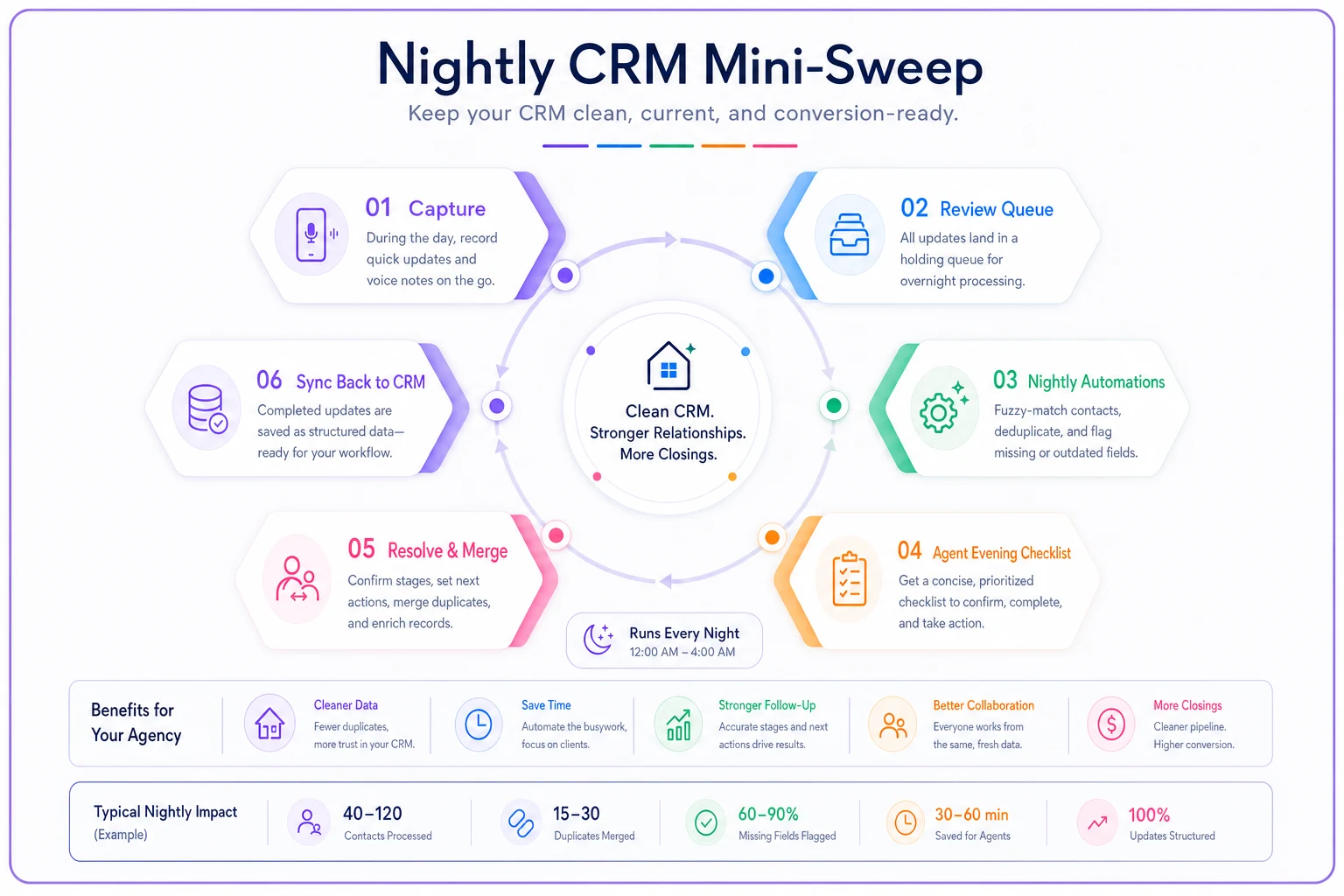
The visualization shows how a short agent review combined with overnight automation keeps data usable without disrupting field speed.
Automation triggers that protect data instead of just moving it
Automation in a mobile CRM shouldn't just fire emails. Its more valuable job is guarding integrity — catching the gaps that phone-first entry naturally creates.
A few triggers worth building:
-
Stage-change without a next-action date → flag for the nightly sweep. This single rule catches most "I'll follow up later" evaporation.
-
Contact marked "hot" but no activity in 48 hours → escalate. Hot leads going cold from neglect is the most expensive silent failure in a pipeline. If you want the follow-up mechanics behind this, the workflow in portal lead to booked appointment in 24 hours pairs well here.
-
New freetext contact created on mobile → run a fuzzy match against existing records overnight. Catch the duplicate before it multiplies.
-
Voice note attached but no structured field updated in 24 hours → remind the agent. The note was captured; now make sure the decision made it into an actual field.
Phone-first entry trades completeness for speed. These triggers quietly fill the completeness gap back in — without asking the agent to stop the car for a fifth field.
When strict mobile rules actually make sense — and when they don't
Not every agency needs this level of structure. A solo agent doing eight transactions a year can probably survive on memory and a loose notes field. The overhead of templates and nightly sweeps isn't worth it at that volume.
This makes sense when:
-
You have multiple agents entering data into a shared CRM and inconsistency is costing you handoffs.
-
Your pipeline volume is high enough that memory genuinely fails — usually somewhere past 30–40 active contacts per agent.
-
You run reports or automations that depend on clean stage data and they keep breaking.
This is a bad idea when:
-
You'd be adding rules to a CRM nobody currently uses at all. Fix adoption first; structure second. Strict fields on an abandoned CRM just make it more abandoned.
-
Your team is two people who already talk constantly and never lose track of a deal. Don't manufacture process you don't need.
Who should not do this: any team that hasn't first agreed on what the stages actually mean. Quick-update templates are useless if "interested" means three different things to three agents. Sort the taxonomy first, then build automation around it.
A real scenario: a five-agent team drowning in freetext
A small residential team — five agents, roughly 300–350 active buyer and seller contacts at any given time — kept running into the same wall. Their pipeline reports were meaningless because agents entered stage updates as freetext from their phones. The team lead was spending most of a Sunday each week trying to figure out which deals were actually live.
The change was unglamorous. They cut the mobile-required fields down to four, built around six quick-update templates for buyer-side and five for seller-side, and set a rule that voice notes had to start with the contact's name and the next step. Then each agent committed to a five-minute nightly sweep.
Within a few weeks the pipeline report was trustworthy for the first time. Duplicate contacts dropped noticeably once new freetext names got flagged overnight instead of piling up. The team lead's Sunday reconstruction session basically disappeared — the data was already usable by Monday because it got cleaned the same night it was created, not a week later.
Nothing about that outcome came from fancy technology. It came from designing the mobile experience for the 40-second reality it actually lives in, and adding just enough automation to catch what speed leaves behind.
The takeaway
Clean CRM data isn't won at the desk — it's won or lost in the field, on a phone, in the gap between appointments. Demand only the four fields that decay fastest, turn stage updates into taps instead of sentences, give voice notes a structure so transcripts stay usable, and run a tiny nightly sweep while the details are still warm. Do that, and the reports, the follow-ups, and the automations downstream finally have something honest to work with. Skip it, and no amount of desktop-side cleanup will keep up with the mess your own agents create every single day out in the driveway.
Ready to elevate your real estate business?
Join 2,000+ agencies using TryRealy to streamline operations, close deals faster, and deliver exceptional client experiences.