


The photos leave your photographer's Lightroom export looking perfect. Clean, color-corrected, sequenced kitchen-to-backyard the way a buyer would actually walk the house. Two days later the same set is live on three portals — and on one of them the primary image is a bathroom mirror shot, on another the photos are shuffled, and on a third half the gallery is missing entirely.
Nobody touched them manually. The files just... degraded on their way through your pipeline.
This is almost always a metadata problem, not a file problem. The pixels are fine. What's broken is everything around the pixels — the filename, the EXIF fields, the ordering hints, the caption blocks that different systems read (or ignore) in different ways. And because most small agencies never wrote down a single rule for any of that, every photographer, every VA, and every syndication feed makes its own quiet decisions.
This post is about fixing the whole chain: naming, metadata, the acceptance check at ingest, and a weekly audit you can actually run. It's the layer underneath your creative pipeline — if you've already tightened production with something like a timeboxed creative production pipeline, this is what keeps those assets from falling apart in transit.
The specific failure: how a clean photo set turns into a syndication mess
Here's the sequence, mapped step by step.
A photographer shoots 42 images. Their export names them IMG4471.jpg through IMG4512.jpg — sequential camera numbers, no property reference. They drop them in a Dropbox folder called Maple St final.
A VA renames a few (front.jpg, kitchen2.jpg, MASTER BEDROOM.jpg) but not all of them, because they got pulled onto something else halfway through. Now the folder has three naming styles in it.
Someone uploads the set to the MLS. The MLS sorts images alphabetically by filename unless you manually drag them. So IMG_4471.jpg (which happens to be a closet) sorts before front.jpg. The order the photographer intended is gone.
Then syndication kicks in. The MLS pushes to Zillow, Realtor.com, your IDX site, and a couple of portals via feed. Each destination:
-
reads a different field for the "primary photo"
-
honors or ignores your intended sort order
-
truncates captions at a different character count
-
strips or preserves EXIF depending on their processing
By the time it lands on the third portal, the primary image is whatever sorted first, the captions are half-gone, and two photos were rejected because their embedded color profile confused the ingest.
The root cause isn't any single system. It's that the asset had no canonical identity — nothing about the file itself declared which property it belonged to, what order it went in, or which image was the hero. Every downstream system was left to guess, and they all guessed differently.
Canonical naming: the one rule that prevents half of these problems
Filenames are the cheapest metadata you have, and they travel everywhere. A good naming convention survives Dropbox, MLS, email, and most feed processors without any special software reading it. It's the closest thing to a universal ID your assets ever get.
Never miss a showing or follow-up again.
TryRealy helps you schedule, track, and manage every client interaction smoothly.
- Unified property and client management
- Automated client notifications
- Integrated sales pipeline tracking
No credit card required
Here's the structure that holds up across portals:
{MLSID}{PROPERTYSLUG}{ASSETTYPE}{SEQ}{VERSION}.{ext} Example: A4571123412-maple-stphoto001v1.jpg A4571123412-maple-stphoto002v1.jpg A4571123412-maple-stvideo001v1.mp4 A4571123412-maple-stfloorplan001v1.jpg
| Segment | Purpose | Rule |
|---|---|---|
MLSID | Ties the asset to the listing of record | Always first, so files group by listing when sorted |
PROPERTYSLUG | Human-readable sanity check | Lowercase, hyphenated, no spaces or punctuation |
ASSETTYPE | Separates photo / video / floorplan / tour | Fixed vocabulary — no free text |
SEQ | Controls display order | Zero-padded (001, not 1) so alpha-sort = intended order |
VERSION | Tracks re-edits and re-shoots | v1, v2 — never overwrite, always increment |
The zero-padding detail is the one people skip, and it's the one that bites. Without it, image 10 sorts before image 2 on any system that orders alphabetically. Pad to three digits and your intended sequence survives every alpha-sort in the chain — MLS included.
Zero-pad sequence numbers to three digits (
001) so alpha-sort preserves your intended order.
The ASSETTYPE vocabulary matters more than it looks. When it's a fixed list — photo, video, floorplan, tour, drone, twilight — your audit script can count what's present and flag what's missing. Free-text descriptions can't be counted reliably.
EXIF and embedded metadata: what to set, what to strip
Filenames get you order and identity. Embedded metadata (EXIF, IPTC, XMP) is where captions, copyright, and the "primary photo" signal live — and where things get inconsistent because most people never look inside the file.
A few things worth knowing before you write any rules:
-
EXIF holds camera data (device, GPS, timestamp, orientation). Some of it you want gone.
-
IPTC/XMP holds descriptive data (caption, headline, copyright, keywords). This is what portals actually read for captions.
-
GPS coordinates get embedded automatically by phones and many cameras. Publishing a listing photo with precise GPS is a privacy issue you don't want, especially for occupied homes.
Your embedded-metadata policy should be short and enforced at ingest:
Strip on every asset:
-
GPS / location EXIF
-
Device serial numbers
-
Original camera-generated filename references
Set / require on every asset:
| Field (IPTC/XMP) | Example value | Why |
|---|---|---|
Copyright | © 2026 [Agency Name]. All rights reserved. | Ownership travels with the file |
Creator | [Photographer name or vendor] | Attribution + accountability |
Headline | 412 Maple St — Living Room | Portal caption source |
Description | Short room/feature caption | Fallback caption field |
Keywords | photo, interior, staged, v1 | Feeds your audit queries |
Orientation is the sneaky one. A photo shot in portrait can carry an EXIF orientation flag that says "rotate 90°." Some systems honor it, some bake it in, some ignore it — which is why the same image appears sideways on one portal and correct on another. The fix is to bake rotation into the pixels and reset the orientation flag to 1 (normal) during processing, so no downstream system has to interpret anything.
The auto-ingest acceptance check: the gate that stops bad assets early
The single highest-leverage thing you can add is an acceptance check at the moment assets enter your system — before they touch the MLS. Think of it as a bouncer. If a file doesn't meet the rules, it gets kicked back to the photographer or VA immediately, while the shoot is still fresh, instead of surfacing three days later on a live portal.
Here's the acceptance checklist to run on every incoming asset set:
-
Filename matches the canonical pattern (regex validated)
-
MLSID in filename matches an active listing in your system
-
Sequence numbers are contiguous (no gaps, no duplicates)
-
At least one asset flagged/named as primary (
_001reserved for hero) -
Minimum asset count met for the listing tier (e.g. 20+ photos)
-
Resolution meets floor (portals reject small images — set a min like 1024px on the short side)
-
File size under the portal ceiling (many cap around 10MB per image)
-
GPS/location EXIF absent (privacy)
-
Copyright + Creator fields present
-
Orientation flag normalized to 1
-
No duplicate images (perceptual hash match within the set)
Run these as a numbered ingest flow:
-
Receive the asset drop (folder, upload, or vendor handoff).
-
Validate filenames against the canonical regex. Reject the whole set on any mismatch.
-
Cross-check MLSID against active listings. Reject if no match — this catches assets landing on the wrong property.
-
Verify sequence integrity (contiguous, padded, one primary).
-
Inspect embedded metadata — strip GPS, confirm required fields, normalize orientation.
-
Check technical floors — resolution, file size, count.
-
Perceptual-hash for duplicates across the set.
-
Accept → stage for syndication or Reject → return with a specific reason list.
That last part matters. A rejection that just says "failed" trains people to shrug and re-upload. A rejection that says "3 files missing copyright, image 007 has GPS data, sequence jumps from 011 to 013" tells the photographer exactly what to fix. Specific rejections change behavior; vague ones don't.
This is also where AI-assisted operational tooling earns its keep quietly — reading embedded metadata, matching filenames against listings, and hashing for duplicates is tedious, exactly-repeatable work that software should handle so a person only sees the exceptions. The point isn't automation for its own sake. It's that a human manually checking EXIF fields on 40 photos per listing, across a dozen listings a week, will start missing things by Thursday. A consistent automated check won't.
Here's a simple diagram of the ingest acceptance flow.
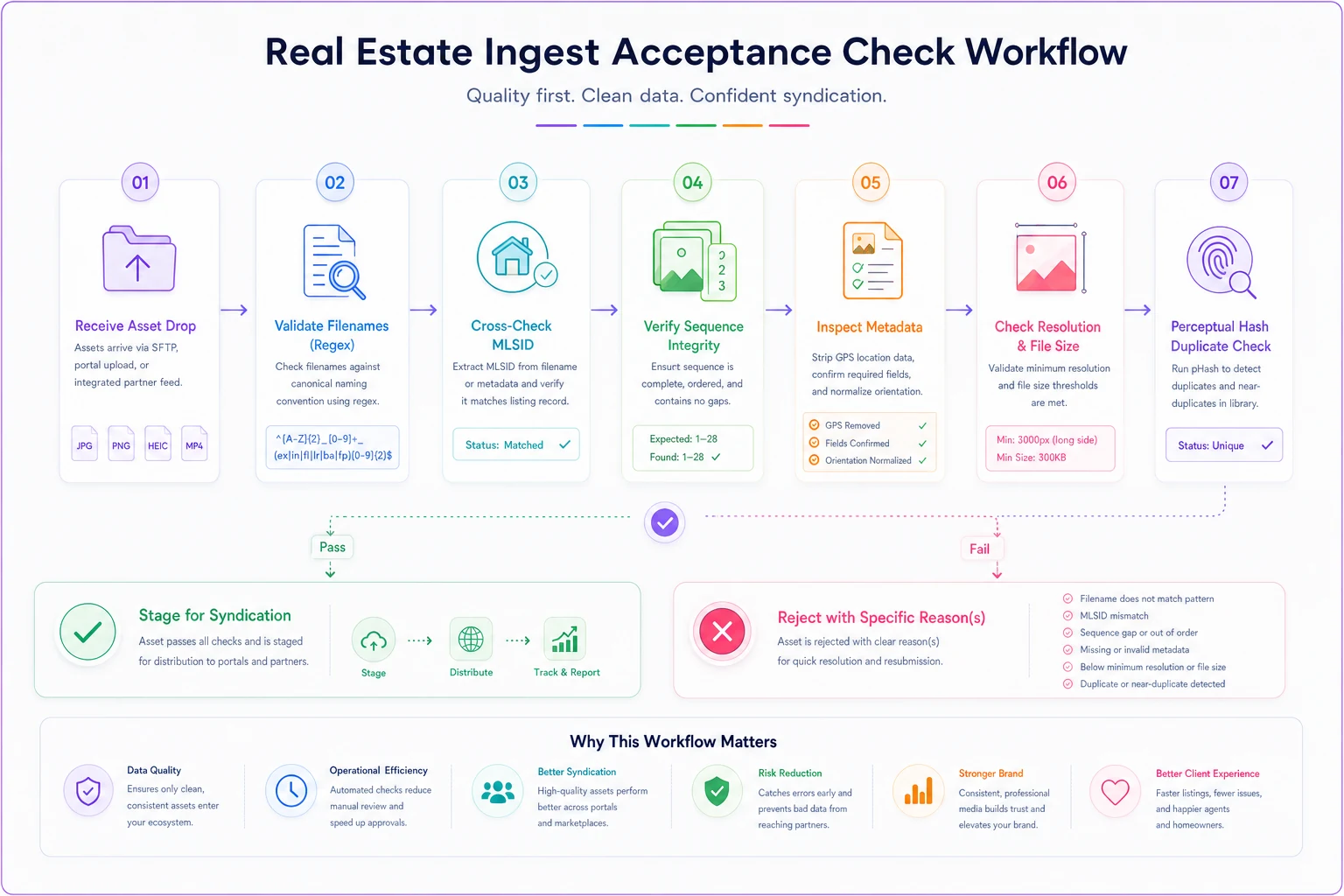
A clear, specific rejection message makes the whole loop faster and trains vendors to comply.
The weekly audit: catching what slipped through anyway
Even with a solid ingest gate, drift happens — a listing gets a re-shoot, a VA uploads directly to a portal bypassing the gate, a feed silently drops images. A weekly audit is your net.
The audit answers a small set of blunt questions per active listing:
-
Does every active listing have the minimum asset count?
-
Does every listing have exactly one primary photo, and is it the intended one?
-
Are there version conflicts (both
v1andv2of the same asset live)? -
Do the asset counts match across MLS and each portal? (A gap means something got dropped in syndication.)
-
Any assets with missing required metadata or leftover GPS?
-
Any orphaned assets (files whose MLSID no longer maps to an active listing)?
Here's the shape of the audit queries in plain SQL, assuming an assets table populated at ingest:
-- Listings below the photo minimum SELECT mlsid, COUNT() AS photocount FROM assets WHERE assettype = 'photo' AND status = 'active' GROUP BY mlsid HAVING COUNT() < 20; -- Listings missing exactly one primary SELECT mlsid, COUNT() AS primarycount FROM assets WHERE seq = '001' AND status = 'active' GROUP BY mlsid HAVING COUNT() <> 1; -- Version conflicts (multiple live versions of same asset) SELECT mlsid, assettype, seq, COUNT(DISTINCT version) AS versions FROM assets WHERE status = 'active' GROUP BY mlsid, assettype, seq HAVING COUNT(DISTINCT version) > 1; -- Assets still carrying GPS after ingest SELECT mlsid, filename FROM assets WHERE gpspresent = TRUE; -- Portal count mismatch vs MLS SELECT a.mlsid, a.mlscount, p.portalname, p.portalcount, (a.mlscount - p.portalcount) AS gap FROM mlsassetcounts a JOIN portalassetcounts p ON a.mlsid = p.mlsid WHERE a.mlscount <> p.portal_count;
The portal count mismatch query is the one that surfaces syndication reliability problems you'd otherwise never see. If the MLS shows 34 photos and Zillow shows 31, three images silently didn't make it — and no one gets an alert from the portal. That gap is exactly what a weekly audit is for. This ties directly into broader listing syndication governance and canonical field mapping — metadata is one field family inside that larger contract.
Run the audit every Monday morning, output a short exception list, and assign each exception an owner. The audit isn't valuable because it finds problems; it's valuable because it finds them before a seller does.
A real scenario
A five-agent brokerage doing around 18–22 active listings at a time kept getting the same complaint: sellers noticing their "best" photo wasn't the first one buyers saw, and occasionally a whole listing showing 8 fewer photos on one portal than another.
They weren't sloppy — they used a real photographer and a shared drive. But there was no naming standard and no check between the photographer's export and the MLS upload. Filenames were a mix of camera numbers and half-renamed files, and nobody was comparing portal counts to the MLS.
They put in three things: the canonical naming pattern enforced by regex at upload, an ingest check that stripped GPS and normalized orientation, and the Monday audit with the portal-mismatch query.
Over the next couple of months the wrong-primary complaints basically stopped, and the audit caught a handful of silent portal drops that would have otherwise gone unnoticed — each one fixed within a day instead of sitting live for a week. The time cost was actually small: the person handling uploads spent less time overall, because rejected sets came back with a clear reason list instead of getting discovered and re-done days later. Nothing dramatic — just fewer awkward calls from sellers and cleaner listings across every portal.
When this level of governance makes sense — and when it doesn't
When it's worth building the full system:
-
You're syndicating to multiple portals through a feed (any mismatch is invisible without an audit).
-
You use outside photographers or VAs, so multiple hands touch the files.
-
You run more than a handful of active listings at once — manual checking stops scaling fast.
When it's overkill:
-
You're a solo agent handling 2–3 listings, uploading photos yourself directly to one MLS, dragging them into order by hand. You can eyeball it. Writing regex for two listings a month isn't the best use of your time.
Who should absolutely not skip it:
-
Any agency where the person shooting photos and the person uploading them are different people, and the listing count is high enough that "I'll just check each one" quietly became "I stopped checking in March."
The naming convention alone — even with no software behind it — prevents the single most common failure (order and identity). Start there. Add the ingest check when the manual version starts slipping. Add the audit the first time a seller catches a portal drop before you did.
The point of all this
Metadata governance isn't glamorous, and it's easy to treat as a technicality. But the photos and video are the product a buyer sees first, and the difference between a listing that looks intentional across every portal and one that looks scrambled comes down to a few rules applied consistently — a naming pattern, a short list of required fields, a gate at ingest, and a query you run on Mondays.
Good photo metadata governance in real estate isn't about doing more work. It's about writing down the rules once so the same mistakes stop happening quietly, in the gap between your photographer's export and what the buyer actually sees.
Ready to elevate your real estate business?
Join 2,000+ agencies using TryRealy to streamline operations, close deals faster, and deliver exceptional client experiences.