


Most agencies don't get burned by automation on day one. They get burned three months in, when a rule that worked fine at 40 leads a week starts misfiring at 200, and nobody notices until a seller calls asking why they got a text addressing them as "FIRSTNAME."
Automation doesn't fail loudly. It fails quietly, in the gaps between systems, and by the time you see the damage it's already cost you a few appointments, a couple of annoyed clients, and some trust with an agent who now refuses to rely on "the system." Governance is what stops that. Not fancy tooling — actual rules about what your automations are allowed to do, what they're not, and who's watching.
This is the framework that tends to hold up across agencies scaling from one team to five or six. It's less about the tech and more about deciding, up front, how much you're willing to let a machine touch before a human has to sign off.
Start by sorting your automations by what happens when they're wrong
The single biggest mistake small agencies make is treating all automation the same. A workflow that reorders your task list is not the same as one that sends a legally-flavored message to a client, but most agencies apply the same casual oversight to both — which usually means none.
The fix is boring but effective: classify every automation by blast radius. Ask one question — if this fires incorrectly, who feels it and how bad is it? That question sorts almost everything cleanly.
| Risk tier | What it touches | Example automations | Oversight required |
|---|---|---|---|
| Low | Internal only, reversible | Task creation, tagging leads, moving deals between pipeline stages, internal Slack pings | Fully automatic, weekly spot-check |
| Medium | Client-facing but low stakes | Appointment reminders, "thanks for touring" texts, drip nurture emails | Automatic with confidence threshold + nightly audit |
| High | Client-facing, hard to undo, or reputation-sensitive | First-contact messages to new leads, price-drop notifications, offer status updates, review requests | Human-in-the-loop approval before send |
| Critical | Money, contracts, or compliance | Anything touching commission splits, contract deadlines, wire/closing communication | No automation without explicit sign-off; logged and double-checked |
The pattern worth noticing: most agencies over-automate the High tier because it feels like where the time savings are, and under-govern the Medium tier because it seems harmless. But Medium is where the volume lives, so a small error rate there produces the most total damage. A reminder system that's wrong 2% of the time sounds fine until it's sending 600 reminders a week.
If you've already built out an operational risk framework for your agency, this classification should plug directly into it — automation risk isn't a separate category, it's just risk that runs faster and repeats more.
Confidence thresholds: the dial nobody sets on purpose
Every automation that makes a decision has a confidence level, whether you configured it or not. When your system decides "this lead is a buyer, send the buyer sequence," there's a probability attached to that guess. Out of the box, most tools are tuned to act rather than pause, so they'll happily send a buyer sequence to someone who's actually a seller because the match was 55% confident.
Never miss a showing or follow-up again.
TryRealy helps you schedule, track, and manage every client interaction smoothly.
- Unified property and client management
- Automated client notifications
- Integrated sales pipeline tracking
No credit card required
-
Above 90% confidence — act automatically (for Low and Medium tier only)
-
70–90% confidence — act, but log it and surface it in the nightly audit
-
Below 70% confidence — route to a human, don't send
The exact numbers matter less than the discipline of setting them at all. In practice, the first draft of thresholds is almost always too permissive. You set 70% because it seems reasonable, then you spend a week reviewing what fell in the 70–80% band and realize a third of it was garbage. So you raise the floor. Governance is iterative — you tighten as you learn what your data actually looks like.
One specific trap: lead-source parsing. When leads come in from portals, form fills, and referrals, the automation guessing which bucket a lead belongs to is often far less confident than the pipeline treats it. If your attribution and routing depend on that guess, a low-confidence match early in the chain contaminates everything downstream. This is exactly why the data contracts between your MLS, CRM, and vendor integrations matter so much — clean, well-defined inputs let you set higher confidence thresholds because the system isn't guessing as much in the first place.
Human-in-the-loop rules that don't create a bottleneck
The knee-jerk reaction to automation risk is "let's just have someone approve everything." That doesn't scale, and worse, it trains people to rubber-stamp. When someone has to approve 80 messages a day, by message 20 they're clicking approve without reading. You've built a review process that provides zero actual review.
Good human-in-the-loop design is selective. The human only sees what genuinely needs judgment.
-
Is it in the High or Critical tier? If yes, human review is mandatory regardless of confidence.
-
Is it Medium tier but below the confidence threshold? Route to a human.
-
Is it a first-ever interaction with a new contact? First impressions get a human glance even if the system is confident — the cost of a bad first message is disproportionate.
-
Everything else — let it run, catch problems in the audit.
The volume that reaches a human should be small enough that they can genuinely evaluate each item. If your review queue is growing faster than people can clear it, your thresholds are wrong or your tiering is too aggressive.
One thing that actually works: assign review by role, not by availability.
If lead-routing approvals land on whoever's free, they get treated as interruptions. If they're a defined part of one person's morning block, they get done properly. This ties back to how you've structured responsibilities in your operations manual and RACI templates — automation approvals need an owner, same as any other operational task.
The nightly audit: your cheapest insurance
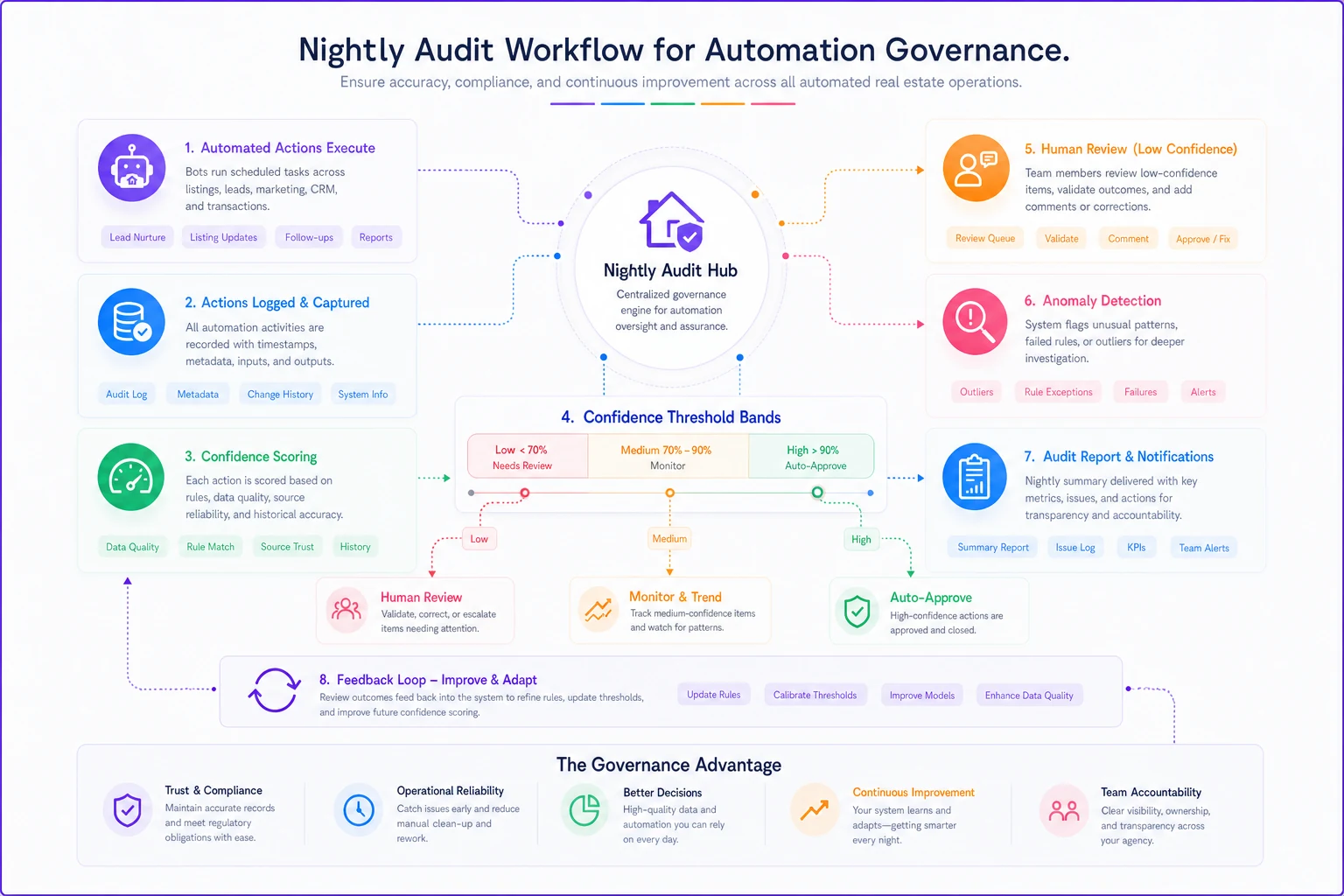
Everything in the Medium tier and the 70–90% confidence band runs without pre-approval. That's the whole point — you don't want a human gating high-volume, low-stakes work. But "no pre-approval" doesn't mean "no oversight." It means the oversight happens after, in batch, at night, when it's cheap.
A nightly audit is a scheduled review of everything the automations did in the last 24 hours that fell into the "act but log it" zone. You're not re-checking every action — you're scanning for patterns and outliers.
Here's a simple visualization of the nightly audit workflow and feedback loop.
-
Every action taken at 70–90% confidence, grouped by type
-
Any message that went to a contact with missing or malformed fields
-
Duplicate sends (same person, same message, within a window)
-
Automations that fired an unusually high number of times compared to the daily baseline
-
Anything routed to a human that's been sitting unreviewed past its SLA
The insight most agencies miss: the audit isn't just for catching errors, it's for retuning thresholds. When you review the 70–90% band every night for a couple of weeks, you learn exactly where your confidence numbers should sit. A message type that's consistently correct at 72% can have its threshold lowered. One that's frequently wrong at 85% needs to move to human review. The audit is your feedback loop.
Keep it short. A nightly audit that takes 45 minutes won't get done. Aim for a 10-minute scan of a summary, with drill-down available only when something looks off.
Incident runbooks: what to do when it's already broken
Something will eventually go wrong. A rule will misfire, an integration will send stale data, a contact list will get the wrong sequence. Governance isn't about pretending this won't happen — it's about making sure that when it does, the response is fast and doesn't depend on one person remembering what to do at 9pm.
An incident runbook is a pre-written response for the failure modes you can predict. For a small agency, you don't need dozens. Three or four covering the things that actually happen is enough.
-
Detect — flagged by nightly audit, an agent report, or a client complaint.
-
Contain — immediately pause the specific automation (not the whole system). Every workflow should have a kill switch you can hit without an engineer.
-
Assess — pull the log of every action that automation took since the last known-good point. How many contacts affected? How bad?
-
Communicate — if clients received wrong messaging, decide within 30 minutes whether a correction goes out. Usually a short, human, apologetic follow-up beats silence.
-
Roll back — restore any data the automation changed (see below).
-
Fix root cause — don't re-enable until you know why it broke.
-
Log — record what happened, what fixed it, and what threshold or rule changed as a result.
The part people skip is the kill switch. If pausing a broken automation requires logging into a settings panel, finding the right rule, and disabling it while it's still firing every few seconds, you'll lose 20 minutes you don't have. Set up the ability to pause individual automations fast, before you need it.
Sample acceptance thresholds
-
Error rate under 1% across a test batch of at least 50 real actions
-
Zero incidents involving malformed personalization fields
-
Confidence distribution reviewed — no more than roughly 15% of actions falling in the below-threshold zone
-
A named owner assigned for the nightly audit
If it can't clear those, it stays in human-in-the-loop mode until it can.
Sample rollback logic
-
Halt the automation and cancel any queued actions not yet sent
-
Restore affected records to their pre-automation state from the most recent backup or change log
-
Re-tag affected contacts with an "impacted by incident" flag so follow-up is trackable
-
Generate a list of contacts who received an erroneous action, for manual correction
The point isn't to have a literal script for every scenario — it's to have decided, in advance, what "undo" means for each automation. An automation that only creates tasks is trivially reversible. One that sends texts is not, which is exactly why texting sits higher in the risk tiering.
When heavy governance actually makes sense — and when it doesn't
Not every agency needs all of this on day one. If you're running a handful of simple automations and touching a few dozen leads a week, a full nightly audit is overkill. You'll spend more time governing than the automation saves.
This level of governance makes sense when:
-
You're sending more than a few hundred client-facing automated messages a week
-
Multiple people rely on automations they didn't build
-
You've had at least one "the system did something weird" moment
-
Your automations touch anything client-facing or money-adjacent
It's overkill when:
-
Your automations are purely internal and reversible
-
One person built everything and watches it daily anyway
-
Volume is low enough that a human could realistically eyeball every action
Who should not rush into aggressive automation: any agency without clean data contracts. If your CRM fields are inconsistent and your lead sources aren't reliably tagged, automating on top of that just scales the mess faster. Fix the inputs first. Automation amplifies whatever it's built on — good data or bad.
A real scenario
A three-agent brokerage had automated their new-lead first-contact texts to hit a 5-minute response window. It worked well — for a while. As lead volume climbed from around 30 a week to over 150 during a busy spring, a parsing rule that guessed buyer-vs-seller intent started misfiring more often, because the higher volume brought in messier form data. Buyers were getting seller sequences and vice versa.
Nobody caught it for about two weeks, because there was no audit — just a set-it-and-forget-it workflow. The damage: roughly 20–25 leads got the wrong opening message, and the owner estimated they lost maybe 3 or 4 appointments to it, plus the harder-to-measure cost of looking sloppy to fresh leads.
The fix wasn't complicated. They moved first-contact from full-auto to a confidence threshold — anything below about 85% intent confidence got a quick human glance before send. They added a 10-minute nightly review of the previous day's first-contacts. Response time crept up slightly, from 5 minutes to around 8, but the wrong-sequence problem essentially disappeared. A small trade of speed for reliability that paid for itself the first week.
The lesson isn't "automation is risky." It's that the automation was fine at 30 leads a week and broke at 150 — and the only thing that would've caught it earlier was governance that scaled with the volume.
The real point
Automation governance in real estate isn't about distrusting your tools. It's about being honest that automations behave differently under load than they do in testing, and that the failures are usually invisible until a client points them out.
The agencies that scale automation successfully aren't the ones with the fanciest workflows — they're the ones who decided in advance what a machine is allowed to do alone, how sure it has to be, who's watching, and what happens when it's wrong. Get the risk tiers right, set thresholds you actually revisit, keep humans in the loop only where judgment matters, run a short audit every night, and write down what to do when it breaks. That's the whole system. Not glamorous, but it's the difference between automation that quietly compounds your capacity and automation that quietly compounds your mistakes.
Ready to elevate your real estate business?
Join 2,000+ agencies using TryRealy to streamline operations, close deals faster, and deliver exceptional client experiences.