


Most small agencies don't fail because they can't sell houses. They stumble when something unexpected hits — a client's data gets exposed, a stager cancels the day before a shoot, an open house draws a stranger who won't leave, or someone realizes the transaction files from three years ago are still sitting in a personal Gmail account. None of these are sales problems. They're operational risk problems, and almost nobody on a small team is assigned to think about them until the moment they blow up.
That's the gap this piece fills. A real estate operational risk framework isn't a legal document or a compliance binder that lives on a shelf. It's a working system — a way to see what could go wrong, decide how bad it would be, and hand your team a runbook they can actually follow at 9pm on a Saturday without calling a lawyer. The whole point is that non-legal ops people can run it.
Below is the compact version: a risk matrix, two incident runbooks worth memorizing, retention timelines, a monthly audit sheet, and the decision rules that tie it all together.
Why small agencies keep getting caught flat-footed
The pattern is almost always the same. A two-to-fifteen person agency grows fast, everyone wears four hats, and the operational risk work — the boring, invisible stuff — never gets owned by anyone. No risk register. No incident plan. When something breaks, three people improvise in a group text and hope it works out.
What breaks at scale is coordination, not effort. At three agents, one person quietly holds all the knowledge: where files live, who the emergency vendor contacts are, what to do if a lead's info leaks. At twelve agents plus a transaction coordinator and two admins, that informal knowledge doesn't transfer. New people don't know the open-house safety protocol because it only ever existed in the founder's head.
A few things worth noting about how these agencies actually operate:
-
Risk lives in the seams. The dangerous stuff happens between roles — the handoff from agent to TC, the vendor who has your client's address and gate code, the CRM export someone emailed to their personal laptop.
-
Everyone assumes someone else is watching. Nobody's checking who still has access to the shared drive, or whether old brokerage forms are still floating around.
-
The response is worse than the incident. A minor data slip becomes a real problem because the team panics, deletes evidence, or tells the client three different stories.
A framework doesn't eliminate risk. It shortens the gap between "something happened" and "we know exactly what to do."
Start with a risk matrix that fits on one screen
Forget enterprise risk registers with 80 line items. A small agency needs maybe 12–18 risks, scored on two axes: how likely it is, and how badly it would hurt. Score each 1–5, multiply, and you get a priority number. Anything scoring 12 or higher gets a runbook. Everything else gets a note and a review date.
Never miss a showing or follow-up again.
TryRealy helps you schedule, track, and manage every client interaction smoothly.
- Unified property and client management
- Automated client notifications
- Integrated sales pipeline tracking
No credit card required
A realistic starting matrix for a small agency:
| Risk | Likelihood (1–5) | Impact (1–5) | Score | Has runbook? |
|---|---|---|---|---|
| Client data breach (CRM/email) | 3 | 5 | 15 | Yes |
| Open-house safety incident | 3 | 4 | 12 | Yes |
| Key vendor cancels last-minute | 4 | 3 | 12 | Yes |
| Wire fraud / spoofed closing email | 2 | 5 | 10 | Yes |
| Agent departs, takes client data | 3 | 4 | 12 | Yes |
| Lost/stolen laptop or phone | 3 | 4 | 12 | Yes |
| MLS listing error (price, address) | 4 | 2 | 8 | Note only |
| Missed disclosure deadline | 2 | 5 | 10 | Yes |
| Duplicate/bad CRM records | 4 | 2 | 8 | Note only |
| Social media / review crisis | 2 | 3 | 6 | Note only |
The scoring itself matters less than the conversation it forces. When a team sits down and actually rates wire fraud a 10 and realizes they have zero process around it, that's the moment the framework earns its keep. Most agencies find their highest-scoring risks are exactly the ones nobody owns.
Update this quarterly. Likelihood shifts with the market — wire fraud attempts spike during busy closing seasons, and vendor cancellations climb when everyone's slammed.
Incident runbook: the open-house safety event
Open houses are the one place your team routinely invites strangers into a space alone. Most go fine. The framework exists for the ones that don't — an aggressive visitor, someone casing the property, a medical emergency, or an agent who simply feels unsafe.
A runbook is not a paragraph of advice. It's a sequence someone can follow while their heart is pounding.
-
Get to safety first. Agent moves toward an exit, keeps the phone in hand, does not confront. Nothing else matters until this is done.
-
Trigger the check-in. Agent texts a pre-agreed code word to the ops contact. Code word means "call me now with a fake urgent reason so I have an excuse to leave or create a witness on the line."
-
Escalate by severity. Verbal threat or theft → leave, then call the listing agent and owner. Physical threat or injury → 911 first, everything else second.
-
Document within the hour. While it's fresh
what happened, who was involved, times, any descriptions. Plain notes, no editorializing.
-
Notify the seller. Same day. A short, factual message — what happened, what you did, what changes for the next showing.
-
Debrief within 48 hours. What worked, what didn't, does the matrix score change.
> "Hey — I need you to head out right now, we've got a situation with the [Maple St] closing that can't wait. I'm on the line, tell me when you're in the car."
That script gives the agent a socially acceptable reason to leave without escalating the moment. The person on the phone stays connected until the agent confirms they're safe.
The single biggest failure here is agents working open houses with nobody knowing they're on-site. The fix is straightforward and pairs naturally with how good teams already run their open-house lead follow-up SOP — the same sign-in and scheduling discipline that captures leads should also log which agent is on-site, when, and who their check-in contact is.
Incident runbook: vendor or data breach
This is the one small agencies handle worst, because it feels technical and legal, and non-legal ops people freeze. But the first 24 hours are almost entirely operational, and an ops person can run them.
A "breach" for a small agency usually looks unglamorous:
-
A CRM export emailed to the wrong recipient
-
A departing agent who still has login access two weeks later
-
A stolen phone with client texts and documents
-
A vendor (photographer, stager, TC) whose system got compromised while holding your client list
-
A spoofed email chain trying to redirect closing funds
The breach containment sequence:
-
Contain access. Reset the affected password, revoke the account, or remote-wipe the device. First move, always. Stop the bleeding before you fully understand it.
-
Preserve, don't delete. Screenshot everything. Do not delete the misdirected email or the suspicious message — that's your record.
-
Scope it. What data, whose data, how many people, and is it still exposed. Write it down even if it's incomplete.
-
Escalate on the decision rules (below). Some incidents you handle internally. Some require a lawyer or notification. The runbook tells you which.
-
Notify affected parties if required — factual, no speculation, no promises you can't keep.
-
Close the hole. Whatever made it possible — no MFA, shared logins, no offboarding process — fix that specific thing before moving on.
The decision rules that keep non-legal ops safe:
-
If any client's personal or financial data left your control → escalate to the broker/owner and a lawyer within 24 hours. Don't guess about notification law yourself.
-
If it was internal only (wrong internal recipient, no sensitive data) → contain, document, log it, done.
-
If money is involved (wire fraud attempt) → stop all fund movement, call the title company by phone using a number you already have, never a number from the suspicious email.
-
If you're unsure whether it's reportable → treat it as if it is until someone qualified says otherwise.
> "We've been notified of a possible data exposure on your end that may involve our clients' information. I need three things today: what data was affected, when it happened, and what you're doing about it. Please send that in writing by end of day."
Vendors are a real exposure point because they hold your data without your controls. This is exactly why vendor accountability shouldn't stop at deadlines — the same discipline behind strong vendor SLAs and scorecards should include a data-handling clause and a breach-notification requirement. If a stager can be scored on turnaround time, they can be held to reporting a breach within 24 hours.
Retention timelines: what to keep, and what to stop keeping
Two opposite mistakes show up constantly. Some agencies keep everything forever — six years of client SSNs sitting in an inbox — which turns every old file into a liability. Others delete things they were legally required to hold. Both come from not having a schedule.
Retention rules vary by state and brokerage, so confirm yours. A workable default schedule for a small agency:
| Record type | Keep for | Then |
|---|---|---|
| Executed transaction files | 5–7 years (per state) | Secure delete |
| Agency agreements / contracts | Term + 5–7 years | Secure delete |
| Client PII in CRM (active) | While active + defined window | Archive or purge |
| Client PII (dead leads) | 12–24 months | Purge |
| Email with sensitive attachments | Move to system of record, then delete from inbox | — |
| Marketing/consent records | Duration of relationship + opt-out log | Retain opt-outs |
| Vendor contracts | Term + 3 years | Delete |
| Open-house sign-in data | Follow-up window (e.g. 90 days), then archive | Purge PII |
Most teams miss this: retention is a security control, not just a compliance chore. Every record you're holding past its useful life is data that can be breached, subpoenaed, or leaked. The safest data is data you no longer have. When a departing agent "takes the client list," the damage is smaller if half that list was already purged as dead leads.
This is also where CRM discipline and risk management overlap directly. If your database is full of duplicates and stale records, you can't tell what you're holding or for how long. Getting retention right depends on the same foundation as your CRM data hygiene routine — required-field rules, dedupe, and a monthly cleanup pass. You can't enforce a retention schedule on a messy database.
The one-page monthly audit sheet
Frameworks die when they're annual. Once a year, everyone forgets. The fix is a fifteen-minute monthly pass that one ops person runs and initials. Keep it to a single page.
Monthly operational risk audit — check and initial:
-
[ ] Reviewed all system access — anyone who left, still have logins? Revoke.
-
[ ] Confirmed MFA is on for CRM, email, and transaction platform
-
[ ] Spot-checked 5 CRM records for stale PII past retention window
-
[ ] Verified last data backup actually completed and is restorable
-
[ ] Reviewed any incidents from the month — logged, debriefed, matrix updated?
-
[ ] Checked vendor list — any new vendors holding client data without an agreement?
-
[ ] Confirmed open-house check-in protocol was followed for the month's events
-
[ ] Reviewed one closing's email trail for wire-fraud red flags
-
[ ] Purged or archived one batch of dead-lead PII
-
[ ] Updated the risk matrix if likelihood/impact shifted this month
The value isn't in any single checkbox. It's that access review, backups, and retention get touched every 30 days instead of only surfacing during a crisis. The most common thing this catches is old access — a former agent or a terminated vendor whose login never got killed. That's the cheapest breach to prevent and the most common one to ignore.
Put the monthly audit on a recurring calendar invite and assign a backup to avoid gaps.
Running the audit itself takes less time than most weekly team standups. The harder part is just making sure someone owns it and it actually happens each month, which is a calendar problem more than anything else.
Where software quietly carries the load
You can run this entire framework on a spreadsheet and a shared doc, and plenty of small agencies do. The parts that fail are the parts that depend on a human remembering — running the monthly audit, revoking access when someone leaves, purging dead leads on schedule, logging who was at which open house.
An operational platform with built-in automation handles the parts that don't need judgment, just consistency. A workflow system can auto-flag CRM records that crossed their retention window, trigger an offboarding checklist the day an agent is marked inactive, remind the ops owner when the monthly audit is due, and keep an incident log that timestamps itself. The framework is the thinking; the automation is what makes sure the boring, repeatable parts actually happen every month without someone chasing them.
A simple workflow diagram can make it clear which tasks the tool should automate:
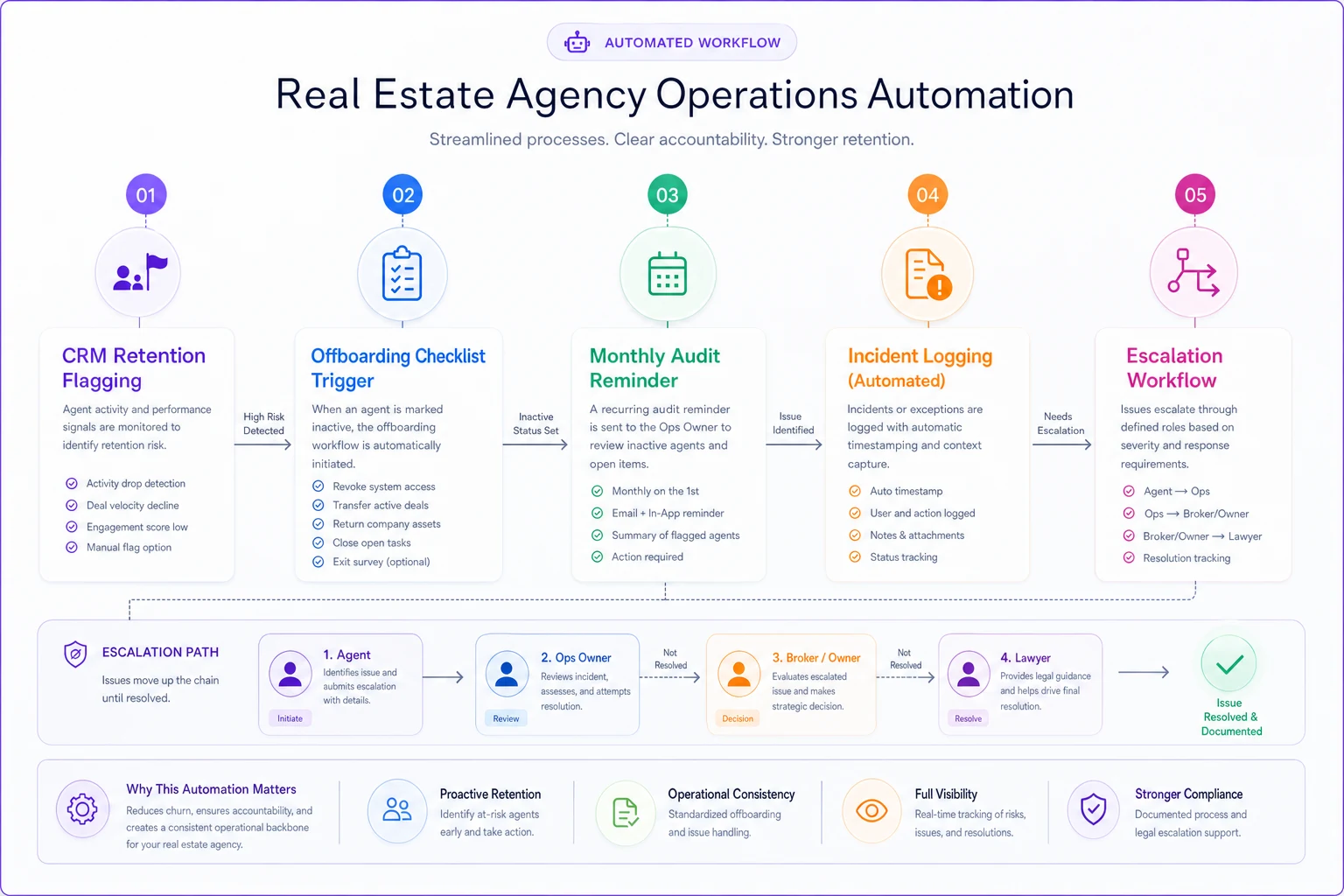
The point isn't to hand risk management to a tool. It's to stop relying on memory for the tasks that only hurt you when they're skipped.
When this framework makes sense (and when it's overkill)
Do this now if: you have more than a couple of agents, you hold client financial data, you run regular open houses, or you use outside vendors who touch client information. Once coordination depends on more than one person's memory, you need the written version.
-
you have more than a couple of agents
-
you hold client financial data
-
you run regular open houses
-
you use outside vendors who touch client information
Scale it down if: you're a solo agent with a handful of transactions a year. You still want the wire-fraud rule and a basic retention habit, but a quarterly matrix review is probably overkill. Keep the two runbooks, skip the ceremony.
Who should not overbuild this: brand-new teams still figuring out their core sales process. Don't spend three weeks building a 40-item risk register before you've closed a deal. Start with the matrix's top five and grow it from there.
A short real scenario
A six-agent residential agency kept every closing file — including client financial documents — in a shared email folder and a mix of personal drives. No retention schedule, no access review, MFA off on half the accounts. When an agent left for a competitor, it took the team almost three weeks to realize she still had full CRM access, and by then she'd exported a chunk of the active pipeline.
Nothing catastrophic came of it legally, but the cleanup cost real time and led to some uncomfortable conversations with clients whose info had walked out the door. Afterward the team put in the basics: MFA everywhere, a same-day offboarding checklist, a retention schedule that purged dead-lead PII after 18 months, and a monthly audit sheet.
The changes weren't dramatic-sounding, but they mattered. Within a couple of months their CRM held roughly a third less stale personal data, access reviews caught two more lingering logins, and the next agent departure took about ten minutes to handle instead of three weeks of scrambling. The risk didn't disappear. The response just stopped being improvised.
The takeaway
An operational risk framework for a real estate agency isn't about predicting every disaster. It's about making sure that when something does go wrong — and it will — your team isn't inventing a response in a panicked group chat. The matrix tells you what to worry about. The runbooks tell you what to do. The retention schedule shrinks how much you can lose. The monthly audit makes sure none of it quietly rots.
Build the top five risks first, write the two runbooks your team is most likely to need, and put the audit on the calendar. You can grow it from there. The agencies that handle a bad day well aren't the ones with the best luck — they're the ones who decided what to do before the bad day arrived.
Ready to elevate your real estate business?
Join 2,000+ agencies using TryRealy to streamline operations, close deals faster, and deliver exceptional client experiences.