


Most agencies don't have an integration problem until they suddenly have five of them at once. The lockbox app stops pushing showing data. The lead source that fed your CRM changes an API field and nobody notices for three weeks. The transaction management tool your closing coordinator swears by got acquired and the sync just... stopped. None of these break loudly. They break quietly, and by the time someone notices, you've lost leads, double-entered data, or missed a follow-up that mattered.
That's the real issue with tool sprawl in a small agency. It's not that any single connection is fragile — it's that nobody owns the whole set, and there's no repeatable way to decide what gets added, what gets watched, and what gets killed off. Integration governance for a real estate agency is basically the discipline of treating every tool connection like a small contract with an expiration date, not a one-time setup you forget about.
This isn't about hiring a developer or building anything technical. It's about running a simple lifecycle — evaluate, onboard, monitor, deprecate — that agents and managers can actually execute without a computer science degree.
Why integrations rot in the first place
Past 6–8 agents, the pattern is almost always the same: tools get added by whoever needs them, when they need them. One agent signs up for a video tour platform. The team lead connects a new lead vendor. The office manager subscribes to an e-sign tool because the old one raised prices. Each decision made sense in isolation.
The problem is that nobody wrote down why each tool exists, what data it touches, or who to call when it breaks. So you end up with 15–25 active tool connections and zero documentation. When something fails, the whole office plays detective.
A few things make this worse over time:
-
The person who set it up left. Half the "why is this connected?" mysteries in agencies trace back to an agent or coordinator who's long gone.
-
Vendors change without warning. APIs get updated, free tiers disappear, companies get bought. Your setup didn't change — theirs did.
-
Success hides the rot. When leads are flowing and closings are happening, nobody checks whether the plumbing is actually healthy. You only find out when a deal slips.
Integration failures rarely announce themselves. A CRM sync doesn't throw a red alarm — it just silently stops writing new records, and you notice two weeks later when a client asks why nobody called them back.
What actually breaks at scale
At 3 agents, you can hold the whole tool stack in your head. At 12, you can't. The failure modes shift as you grow, and it's worth naming them because they need different fixes.
Never miss a showing or follow-up again.
TryRealy helps you schedule, track, and manage every client interaction smoothly.
- Unified property and client management
- Automated client notifications
- Integrated sales pipeline tracking
No credit card required
| Agency size | Typical tool count | What breaks first | Root cause |
|---|---|---|---|
| 2–4 agents | 5–10 | Manual re-entry between tools | No sync, everyone copies data by hand |
| 5–9 agents | 10–18 | Silent sync failures, duplicate records | No monitoring, no clear owner |
| 10–20 agents | 18–30+ | Conflicting data across systems, orphaned tools | No lifecycle, no deprecation, no catalog |
The middle row is where most agencies get stuck. You've added enough tools that manual entry is no longer the pain — now the pain is trust. Which system has the right phone number? Did that lead actually make it into the CRM or is it stuck in the vendor portal? When two systems disagree, which one wins?
This connects directly to data quality. If your integrations aren't governed, your data hygiene falls apart no matter how many rules you write. Worth pairing this with a real CRM data hygiene routine — dedupe rules and required-field guardrails only work if the pipes feeding your CRM are actually reliable in the first place.
The lifecycle: four stages agents and managers can run
The whole point of governance is to make every integration follow the same predictable path. Not a technical process — an operational one.
Here's the lifecycle in one line:
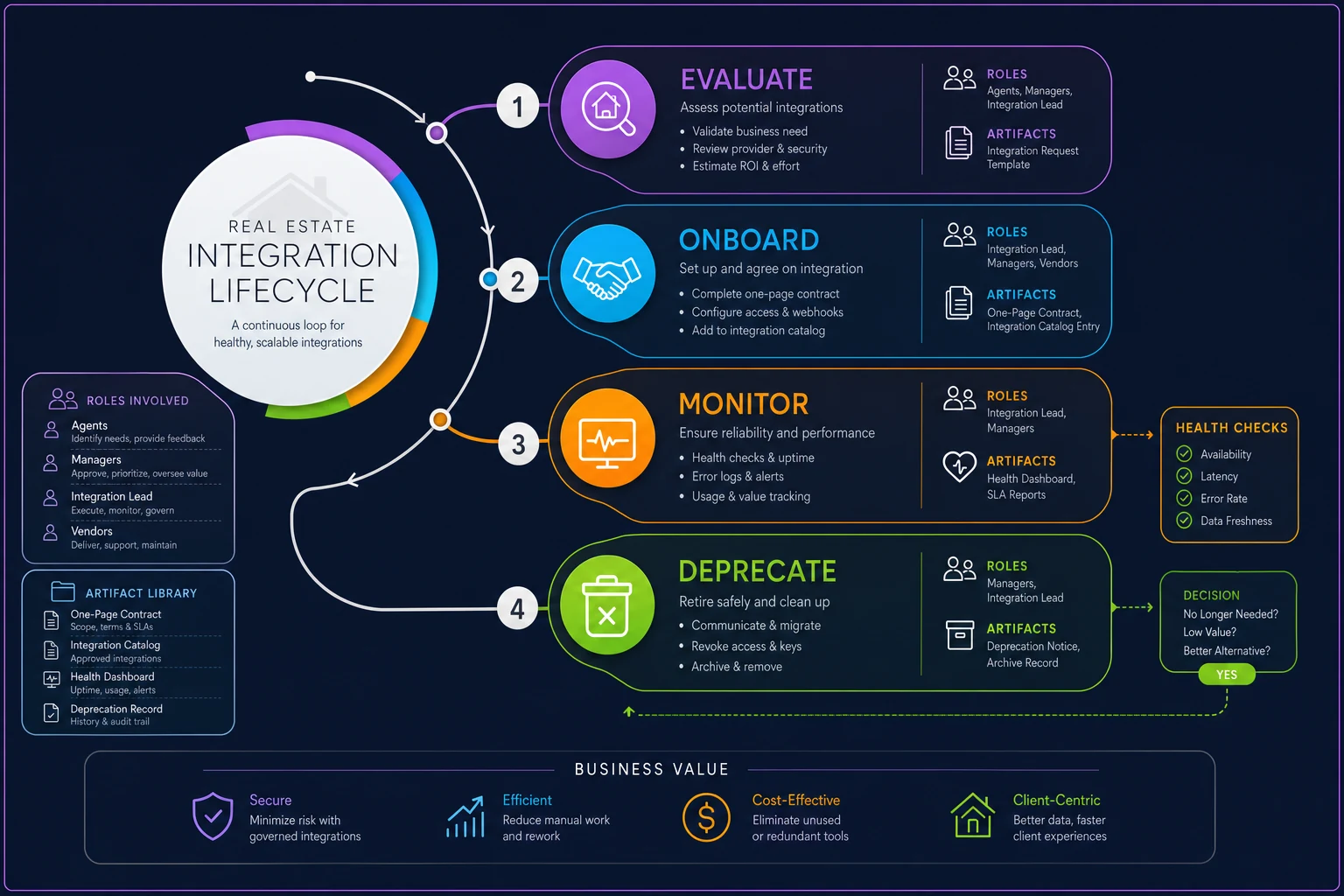
1. Evaluate (before you connect anything)
Before a tool gets added, it goes through a short intake. This is where most agencies skip straight to "just connect it," and it's exactly why the stack becomes a mess.
-
What problem does this solve that our current tools don't?
-
What data does it read, and what data does it write?
-
Who owns it? (A named person, not "the office.")
-
What's the fallback if it disappears tomorrow?
Keep it to a single page. If nobody can articulate what data the tool touches, that's your first red flag. A lot of "must-have" tools don't survive this one question.
2. Onboard (with a lightweight contract)
When a tool passes evaluation, you write a lightweight contract. This isn't a legal document — it's a one-page internal record that lives in your operations folder. Think of it as the tool's ID card.
A good integration contract includes:
-
Name and purpose — one sentence
-
Owner — the person responsible for it
-
Data direction — what flows in, what flows out
-
Expected behavior — e.g., "new leads appear in CRM within 5 minutes"
-
Health check — the simple test that proves it's working
-
Review date — when someone revisits whether it's still needed
That "expected behavior" line is the quiet hero here. It turns a vague sense of "the tool works" into something checkable. If a lead is supposed to appear within 5 minutes and it's taking 3 hours, you now have a defined failure — not a hunch.
For vendors that touch your listing timeline (photographers, stagers, inspectors), pair the integration contract with actual service expectations. The same discipline applies whether the connection is digital or human — which is why vendor SLAs and scorecards are worth running alongside your tool contracts.
3. Monitor (health checks anyone can read)
Monitoring sounds technical. It doesn't have to be. A health check is just a small, repeatable test that confirms the tool is doing what its contract says.
For a lead vendor: submit a test lead once a week and confirm it lands in the CRM. For a syndication feed: check that a specific listing shows correctly on the portals it's supposed to hit. For an e-sign tool: confirm the last three signed documents actually saved back to the transaction file.
The goal is a health dashboard — even if that "dashboard" is a shared sheet with a green/yellow/red status per integration. Green means the last health check passed. Yellow means it's overdue for review. Red means it failed and someone's on it.
What makes this work is rhythm. Health checks that happen "when we remember" happen never. Tie them to a weekly ops review. Ten minutes, run down the list, update the colors. That's it.
Automate scheduled test lead submissions so the weekly ops review focuses on exceptions, not manual checks.
4. Deprecate (kill tools on purpose)
This is the stage everyone skips, and it's why agencies end up paying for tools nobody uses and carrying integrations that create risk without value.
-
If a tool has been red for two consecutive review cycles and nobody's fixed it, flag for removal.
-
If a tool's review date passes twice with no clear reason to keep it, flag for removal.
-
If a tool overlaps 80%+ with another tool you already pay for, consolidate.
The deprecation process itself is short:
-
Announce the tool is being retired and set a date.
-
Confirm no critical data lives only inside that tool.
-
Export anything worth keeping.
-
Disconnect the integration and cancel the subscription.
-
Remove it from the catalog and dashboard.
Step 2 is where people get burned. A tool that seems useless might be the only place a certain piece of data lives. Check before you cut.
Deprecation done right isn't just about cutting costs — it's about reducing the number of places where something can silently go wrong. Every tool you remove is one fewer sync to watch, one fewer vendor relationship to maintain, one fewer failure mode to trace when leads start disappearing.
The non-technical integration catalog
Underneath all four stages sits one artifact that ties everything together: a catalog. A plain-language list of every tool connection you have, readable by someone who's never touched an API.
A workable catalog has one row per integration and columns like:
| Column | What goes here |
|---|---|
| Tool name | The name as it appears on the invoice |
| What it's for | One sentence max |
| Owner | A specific person's name |
| Data in / data out | Plain language description |
| Health status | Green / Yellow / Red |
| Last checked | Date of last health check |
| Next review date | Pre-scheduled, not "eventually" |
The magic isn't in the format — it's in the fact that it exists and stays current. When a new tool gets added, it goes in the catalog. When one gets killed, it comes out. Any manager can open it and understand the agency's entire tool landscape in about two minutes.
This is the operational backbone that makes your data contracts enforceable. If you've already set up formal data contracts for MLS, CRM, and vendor feeds, the catalog is where those contracts become something you actually monitor instead of something you wrote once and forgot.
A real scenario
A nine-agent brokerage running roughly 40–50 active listings had accumulated somewhere around 22 tool connections over three years. Lead vendors, two CRMs (long story), a syndication service, showing software, transaction management, e-sign, a couple of marketing tools.
Their symptom was familiar: leads were "disappearing." Agents blamed the CRM. The CRM company blamed the lead vendor. Nobody could prove anything.
When they built a basic catalog, they found the actual problem in about a day. One lead vendor's connection had silently broken after a platform update roughly six weeks earlier. Nobody noticed because the other lead sources were still flowing, so the CRM never looked empty. They estimated somewhere around 30–40 lost leads in that window — a couple of which were legitimate buyers who went elsewhere.
After setting up weekly health checks and a green/yellow/red dashboard, the meaningful change wasn't just catching that one failure. The office stopped arguing about whose fault things were. When a tool went red, everyone could see it, and one named owner handled it. They also killed four tools in the first cleanup that nobody had used in months — a small but real recurring saving, and fewer places for data to leak.
When this makes sense — and when it doesn't
This makes sense when you're past about five agents, running more than a dozen tool connections, or when you've been burned by a silent failure and never want the "whose fault is it" fight again. If you can't confidently say what happens to your leads between the portal and the CRM, you need this.
This is overkill when you're a solo agent or a two-person team with four tools you touch daily. You already are the monitoring system. Writing contracts for connections you check hourly by muscle memory is just paperwork. Start light — maybe just a one-page catalog — and add lifecycle steps as the stack grows.
One important caveat: don't treat this as a one-time project. The value is entirely in the ongoing rhythm. A catalog built once and never updated is worse than no catalog, because it gives false confidence. If you're not going to run the weekly ten-minute check, don't pretend the dashboard means anything.
Where lightweight automation quietly helps
The monitoring stage is where a little automation earns its keep — not to replace the human review, but to make the health checks less manual. Instead of someone submitting a test lead by hand every week, a workflow platform can run those checks on a schedule and flag anything that fails, so your weekly review becomes "look at the exceptions" instead of "test everything from scratch."
The same goes for the catalog itself. Keeping review dates, owners, and status in one place that nudges the right person when a review is due beats relying on people to remember. Operational software with built-in automation handles the boring, easy-to-forget parts — the reminders, the scheduled checks, the status logging — so your team spends its attention on the judgment calls: is this tool still worth it, and what do we do when it breaks?
The goal isn't to automate the decisions. It's to automate the watching, so decisions actually get made on time instead of six weeks late.
The takeaway
Integration governance isn't a technical project and it isn't a one-time cleanup. It's a lifecycle you run continuously: evaluate before you add, contract when you onboard, check on a rhythm, and retire on purpose. The whole thing rests on two humble artifacts — a one-page contract per tool and a plain-language catalog anyone can read.
Agencies that skip this don't feel the cost until a deal slips or a lead vanishes. The ones that run it stop having the "whose fault is it" argument entirely, because failures become visible, owned, and fixable. For a growing team juggling MLS feeds, a CRM, lead vendors, and a dozen other connections, that visibility is the difference between a tool stack that quietly works and one that quietly falls apart.
Agencies that skip this don't feel the cost until a deal slips or a lead vanishes. The ones that run it stop having the "whose fault is it" argument entirely, because failures become visible, owned, and fixable. For a growing team juggling MLS feeds, a CRM, lead vendors, and a dozen other connections, that visibility is the difference between a tool stack that quietly works and one that quietly falls apart.
Ready to elevate your real estate business?
Join 2,000+ agencies using TryRealy to streamline operations, close deals faster, and deliver exceptional client experiences.